TitleUrlCopy bởi takedajs
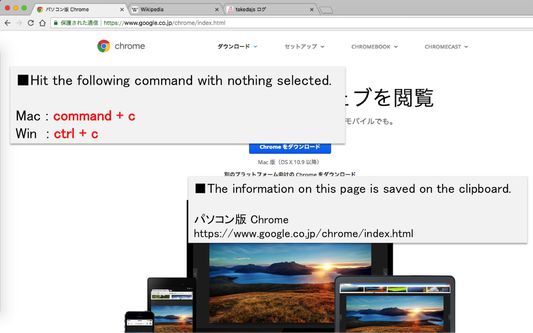
When you press command + c (mac) or or ctrl+c (win) with no character selected, save the site title and URL on the clipboard. 文字を選択していない状態でcommand+c (mac) or ctrl+c (win) を押下した時、サイトのタイトルとURLをクリップボードに保存します。
282 người dùng282 người dùng
Siêu dữ liệu mở rộng
Ảnh chụp màn hình
Về tiện ích mở rộng này
When you press command+c (mac) or ctrl+c (win) with no character selected, save the site title and URL on the clipboard.
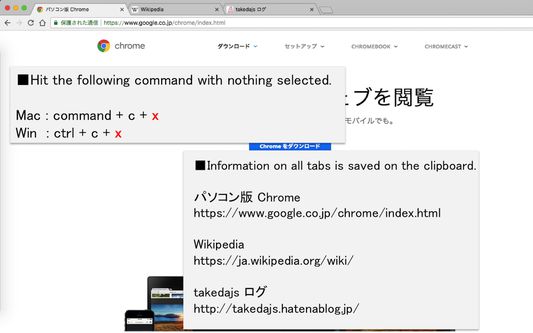
When you want to acquire all tabs: command+c+x (mac) or ctrl+c+x (win).
■option setting
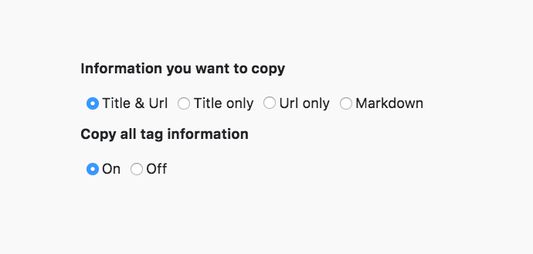
・You can select the information that can be copied from "title & URL", "title only", "URL only" or "Markdown".
・You can choose whether or not to activate functions that can obtain all tabs
文字を選択していない状態でcommand+c (mac) or ctrl+c (win) を押下した時、サイトのタイトルとURLをクリップボードに保存します。
全タブを取得したい場合: command+c+x (mac) or ctrl+c+x (win)。
■オプション設定
・コピーできる情報を「タイトル&URL」、「タイトルのみ」、「URLのみ」、「マークダウン」の4つから選択可能できます。
・全タブ取得できる機能を動作させるかどうか選択できます。
When you want to acquire all tabs: command+c+x (mac) or ctrl+c+x (win).
■option setting
・You can select the information that can be copied from "title & URL", "title only", "URL only" or "Markdown".
・You can choose whether or not to activate functions that can obtain all tabs
文字を選択していない状態でcommand+c (mac) or ctrl+c (win) を押下した時、サイトのタイトルとURLをクリップボードに保存します。
全タブを取得したい場合: command+c+x (mac) or ctrl+c+x (win)。
■オプション設定
・コピーできる情報を「タイトル&URL」、「タイトルのみ」、「URLのみ」、「マークダウン」の4つから選択可能できます。
・全タブ取得できる機能を動作させるかどうか選択できます。
Được xếp hạng 4,6 (bởi 1 người dùng)
Quyền hạn và dữ liệu
Quyền hạn bắt buộc:
- Truy cập các thẻ trên trình duyệt
- Truy cập dữ liệu của bạn trên mọi trang web
Thêm thông tin
- Liên kết tiện ích
- Phiên bản
- 1.4.1
- Kích cỡ
- 18,25 KB
- Cập nhật gần nhất
- 5 năm trước (26 Thg 09 2020)
- Thể loại có liên quan
- Giấy phép
- Giấy phép BSD 2-Clause "Simplified"
- Lịch sử các phiên bản
- Thêm vào bộ sưu tập