Quick Copy bởi Ramit Mittal
A super-powered clipboard for browsers! Use up to 10 configurable shortcuts for copying and pasting, persist clipboard contents across browser restarts, and manage/edit your clipboard contents.
138 người dùng138 người dùng
Siêu dữ liệu mở rộng
Ảnh chụp màn hình
Về tiện ích mở rộng này
Quick copy allows you to save multiple items on your clipboard and access them using shortcuts. You can label, search, edit, delete previously saved clipboard contents.
Management
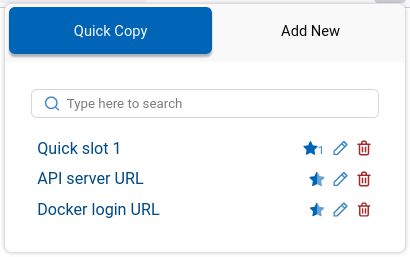
Use the popup UI for managing clipboard contents. The popup allows easy editing of existing clipboard items.
Quick Slots
Access items by using the popup or paste directly into webpages on most websites. Inside a web page, just select the text you want to copy and use the shortcuts. Configure up to 10 shortcuts for copying and pasting with quick slots.
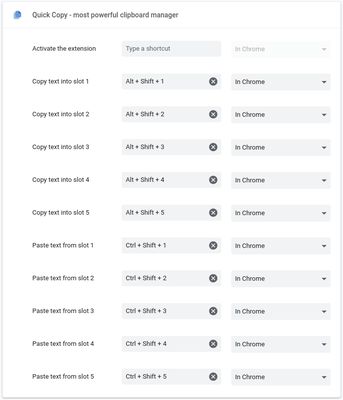
Default shortcuts are:
Management
Use the popup UI for managing clipboard contents. The popup allows easy editing of existing clipboard items.
Quick Slots
Access items by using the popup or paste directly into webpages on most websites. Inside a web page, just select the text you want to copy and use the shortcuts. Configure up to 10 shortcuts for copying and pasting with quick slots.
Default shortcuts are:
Alt+Shift+1 ... Alt+Shift+5 for copying into the 5 quick slotsCtrl+Shift+1 ... Ctrl+Shift+5 for pasting from the 5 quick slotsĐược xếp hạng 5 (bởi 1 người dùng)
Quyền hạn và dữ liệu
Quyền hạn bắt buộc:
- Nhận dữ liệu từ bộ nhớ tạm
- Nhập dữ liệu vào bộ nhớ tạm
- Truy cập dữ liệu của bạn trên mọi trang web
Thêm thông tin
- Liên kết tiện ích
- Phiên bản
- 2.0.0
- Kích cỡ
- 152,29 KB
- Cập nhật gần nhất
- 5 năm trước (17 Thg 06 2021)
- Thể loại có liên quan
- Giấy phép
- Mọi Quyền Được Bảo Lưu
- Lịch sử các phiên bản
- Thêm vào bộ sưu tập