Tiện ích trình duyệt Firefox
Tiện ích mở rộng
Chủ đề
Xem thêm…
cho Firefox
Từ điển & gói ngôn ngữ
Các trang web trình duyệt khác
Tiện ích cho Android
Đăng nhập
Tìm kiếm
Tìm kiếm
Quick Clone
bởi
Kartikay Bagla
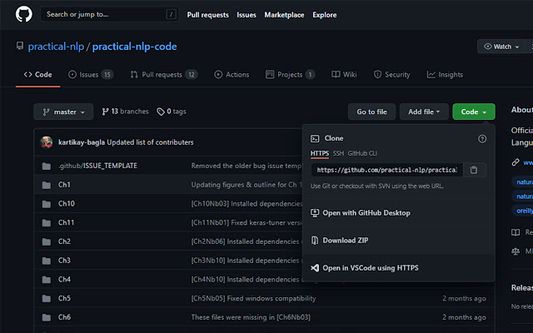
Quick Clone can open GitHub repositories in VS Code with one click.
Thử nghiệm
Thử nghiệm
0 (0 đánh giá)
0 (0 đánh giá)
27 người dùng
27 người dùng
Tải xuống Firefox và tải tiện ích mở rộng
Tải xuống tập tin
Siêu dữ liệu mở rộng
Ảnh chụp màn hình
Về tiện ích mở rộng này
How to use
Install the
VS Code extension
Install the corresponding browser extension
Navigate to a GitHub repository in your browser
Click on the green Code button and select "Open in VSCode"
Once VS Code opens, select the folder where the repository will be cloned
Once the cloning is complete, you can choose to open the cloned folder
Được xếp hạng 0 (bởi 1 người dùng)
Đăng nhập để đánh giá tiện ích này
Chưa có xếp hạng nào
Đã lưu xếp hạng sao
5
0
4
0
3
0
2
0
1
0
Quyền hạn và dữ liệu
Quyền hạn bắt buộc:
Truy cập dữ liệu của bạn cho github.com
Thêm thông tin
Liên kết tiện ích
Trang chủ
Trang hỗ trợ
Email hỗ trợ
Phiên bản
1.0.1
Kích cỡ
15,79 KB
Cập nhật gần nhất
5 năm trước (21 Thg 08 2021)
Thể loại có liên quan
Khác
Giấy phép
Chỉ Giấy phép Công cộng GNU v3.0
Lịch sử các phiên bản
Xem tất cả phiên bản
Thêm vào bộ sưu tập
Chọn một bộ sưu tập...
Tạo bộ sưu tập mới
Báo cáo tiện ích này