Password Paster bởi Prasanta Kakati
Paste password in those website's input field where Ctrl+V doesn't functions
1 người dùng1 người dùng
Siêu dữ liệu mở rộng
Ảnh chụp màn hình
Về tiện ích mở rộng này
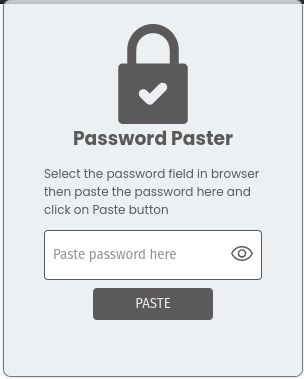
Frequently, we encounter websites that restrict pasting within their password input fields, like the login pages of banking sites. This compels us to manually input the password, which can be even more laborious when dealing with lengthy passwords from a password manager. Moreover, certain websites necessitate entering the password twice during sign-up, demanding a repetitive manual entry. This is where this extension becomes useful.
How to use
- Choose the website's input field.
- Launch the extension.
- Input the password into the extension's designated field.
- Click the "Paste" button.
- And just like that, the password will be populated in the corresponding field on the website.
How to use
- Choose the website's input field.
- Launch the extension.
- Input the password into the extension's designated field.
- Click the "Paste" button.
- And just like that, the password will be populated in the corresponding field on the website.
Được xếp hạng 0 (bởi 1 người dùng)
Quyền hạn và dữ liệu
Thêm thông tin
- Liên kết tiện ích
- Phiên bản
- 0.0.2
- Kích cỡ
- 71,76 KB
- Cập nhật gần nhất
- 2 năm trước (10 Thg 08 2023)
- Thể loại có liên quan
- Giấy phép
- Chỉ Giấy phép Công cộng GNU v3.0
- Lịch sử các phiên bản
- Thêm vào bộ sưu tập