
Paranoia bởi GDR!
Check if your emails arrived TLS-encrypted (and which corporations were able to read it nevertheless)
3 người dùng3 người dùng
Siêu dữ liệu mở rộng
Ảnh chụp màn hình

Về tiện ích mở rộng này
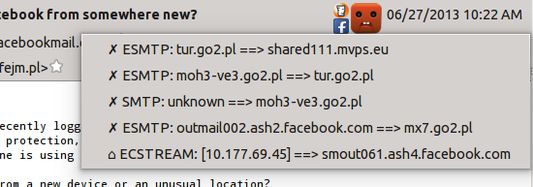
This extension shows two basic pieces of information in the incoming email header pane:
- Was the connection encrypted at all the time when this message was sent between servers?
- Which large corporations had a copy of this message and, theoretically, could read it?
- Yellow super-happy emoticon = connection encrypted at all times, and hasn't passed any known big corporations
- Yellow happy emoticon = connection encrypted on the public Internet
- Blue sad emoticon = 1 connection not encrypted
- Red terrified emoticon = message sent more than 1 time unencrypted, on the public network (internet)
- ✓ - encrypted
- ✗ - unencrypted
- ⌂ - unencrypted, but in a local network
Được xếp hạng 4,3 (bởi 1 người dùng)
Thêm thông tin
- Liên kết tiện ích
- Phiên bản
- 0.3.0
- Kích cỡ
- 90,63 KB
- Cập nhật gần nhất
- 6 năm trước (7 Thg 10 2019)
- Thể loại có liên quan
- Giấy phép
- Chỉ Giấy phép Công cộng GNU v2.0
- Lịch sử các phiên bản
- Thêm vào bộ sưu tập