Convert Case bởi Convert Case Ltd
Convert text in your browser between UPPER CASE, lower case and more.
750 người dùng750 người dùng
Siêu dữ liệu mở rộng
Ảnh chụp màn hình
Về tiện ích mở rộng này
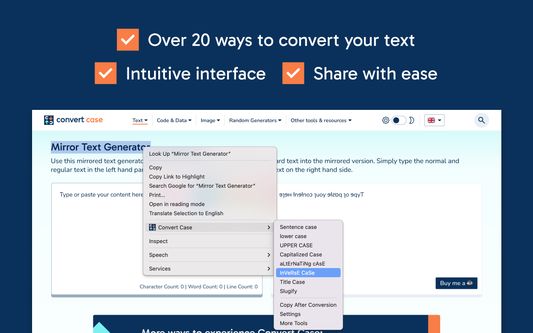
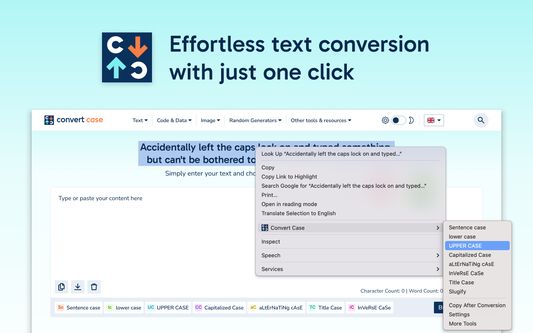
Select text anywhere in your browser, right-click, and convert it in place. Transform between UPPER CASE, lower case, Sentence case, Title Case, and more without leaving the page.
Enable Copy After Conversion in the context menu to automatically copy your converted text to the clipboard.
Features
- In-place text conversion via right-click context menu
- Keyboard shortcuts for quick access (Alt+U, Alt+L, Alt+C, Alt+A) or configure your own
- Automatic copy after conversion option
- Title Case conversion with configurable options
- Slugify for URL-friendly text
- Works with Google Docs (use Shift+right-click or a keyboard shortcut), Reddit, Disqus, WYSIWYG editors, and iframe-based content.
Changelog
- 1.6.0 - Support for Google Docs
- 1.5.2 - Fixed conversions not working on existing tabs after first install
- 1.5.1 - Added keyboard shortcuts link to context menu
- 1.5.0 - Additional keyboard shortcuts and refreshed info/settings UI
- 1.4.1 - Reliability updates
- 1.4.0 - Bug fixes and optimisation
- 1.3.0 - New icon
- 1.2.1 - Disqus and Slate Editor fixes
- 1.2.0 - Support for Disqus and more iframe-based content
- 1.1.0 - Support for Reddit and WYSIWYG editors
- 1.0.10 - Fixed automatic copy after conversion not working
- 1.0.9 - Settings page for title case options and keyboard shortcuts
- 1.0.8 - Reliability updates
- 1.0.7 - Title Case conversion and Slugify option
- 1.0.0 - Initial release
Enable Copy After Conversion in the context menu to automatically copy your converted text to the clipboard.
Features
- In-place text conversion via right-click context menu
- Keyboard shortcuts for quick access (Alt+U, Alt+L, Alt+C, Alt+A) or configure your own
- Automatic copy after conversion option
- Title Case conversion with configurable options
- Slugify for URL-friendly text
- Works with Google Docs (use Shift+right-click or a keyboard shortcut), Reddit, Disqus, WYSIWYG editors, and iframe-based content.
Changelog
- 1.6.0 - Support for Google Docs
- 1.5.2 - Fixed conversions not working on existing tabs after first install
- 1.5.1 - Added keyboard shortcuts link to context menu
- 1.5.0 - Additional keyboard shortcuts and refreshed info/settings UI
- 1.4.1 - Reliability updates
- 1.4.0 - Bug fixes and optimisation
- 1.3.0 - New icon
- 1.2.1 - Disqus and Slate Editor fixes
- 1.2.0 - Support for Disqus and more iframe-based content
- 1.1.0 - Support for Reddit and WYSIWYG editors
- 1.0.10 - Fixed automatic copy after conversion not working
- 1.0.9 - Settings page for title case options and keyboard shortcuts
- 1.0.8 - Reliability updates
- 1.0.7 - Title Case conversion and Slugify option
- 1.0.0 - Initial release
Được xếp hạng 4,6 (bởi 1 người dùng)
Quyền hạn và dữ liệu
Quyền hạn bắt buộc:
- Truy cập các thẻ trên trình duyệt
- Truy cập dữ liệu của bạn trên mọi trang web
Thêm thông tin
- Liên kết tiện ích
- Phiên bản
- 1.6.0
- Kích cỡ
- 41,51 KB
- Cập nhật gần nhất
- 12 ngày trước (18 Thg 03 2026)
- Thể loại có liên quan
- Giấy phép
- Mọi Quyền Được Bảo Lưu
- Lịch sử các phiên bản
- Thêm vào bộ sưu tập
Nhà phát triển của tiện ích mở rộng này yêu cầu bạn giúp hỗ trợ sự phát triển liên tục của nó bằng cách đóng góp nhỏ.