
Paranoia ავტორი GDR!
Check if your emails arrived TLS-encrypted (and which corporations were able to read it nevertheless)
3 მომხმარებელი3 მომხმარებელი
გაფართოების მონაცემები
ეკრანის სურათები

გაფართოების შესახებ
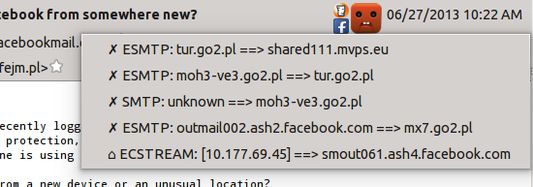
This extension shows two basic pieces of information in the incoming email header pane:
- Was the connection encrypted at all the time when this message was sent between servers?
- Which large corporations had a copy of this message and, theoretically, could read it?
- Yellow super-happy emoticon = connection encrypted at all times, and hasn't passed any known big corporations
- Yellow happy emoticon = connection encrypted on the public Internet
- Blue sad emoticon = 1 connection not encrypted
- Red terrified emoticon = message sent more than 1 time unencrypted, on the public network (internet)
- ✓ - encrypted
- ✗ - unencrypted
- ⌂ - unencrypted, but in a local network
4,3 შეფასება 8 მიმომხილველისგან
დამატებითი მონაცემები
- დამატების ბმულები
- ვერსია
- 0.3.0
- ზომა
- 90,63 კბ
- ბოლო განახლება
- 6 წლის წინ (7 ოქტ 2019)
- მსგავსი კატეგორიები
- ვერსიის ისტორია
- კრებულში დამატება