
PageMark ავტორი PixelGiant
Make some highlights | Take some notes
170 მომხმარებელი170 მომხმარებელი
გაფართოების მონაცემები
ეკრანის სურათები


გაფართოების შესახებ
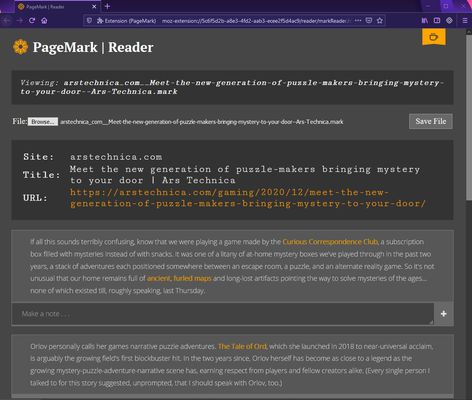
PageMark lets you make highlights and take notes as you read. The included Notes app lets you save your highlights, edit your notes, and even tag, rate, and filter everything to keep useful information organized and top of mind. Useful for students, researchers, and active readers.
This add-on is under active development.
------------------------------------------------------
Mark a paragraph
<right-click> a paragraph and choose PageMark to drop a mark.
Mark will appear at beginning or end of paragraph based on click location.
Highlight a sentence, word, or paragraph
Select some text, <right-click> and choose PageMark.
Alternatively use Block-Marking Mode (below).
*NEW* Block-Marking Mode
[CTRL-ALT-M]: Quickly select blocks of page content. Selectable blocks appear with a dashed outline. Selected blocks comprise a single mark after toggling off.
Add a note
Hover cursor over mark to show "+". Click it to add a note!
Remove a mark
Click a mark to remove it.
Scan between marks
Click PageMark browser button to scroll between markers.
Alternatively use keyboard shortcuts (below).
*NEW* Scan with shortcuts
Scroll to next mark: [CTRL-ALT-DOWN]
Scroll to previous mark: [CTRL-ALT-UP]
Save highlights & notes
Firefox: Tools > PageMark > Save to File
*NEW* Revisit highlights & edit notes
Firefox: Tools > PageMark > Launch Notes
*NEW* Rate, tag, and filter notes
Organize and prioritize notes by tag and star rating
*Marks may be saved to file but are not preserved on page after tab close.
**Only image links are saved to file—not actual images. Changes to hosted image will appear in your local files.
***PageMark is usable on most sites but will auto-disable on certain sites (Gmail, Facebook, Twitter) for compatibility reasons.
Full manual here
This add-on is under active development.
------------------------------------------------------
Mark a paragraph
<right-click> a paragraph and choose PageMark to drop a mark.
Mark will appear at beginning or end of paragraph based on click location.
Highlight a sentence, word, or paragraph
Select some text, <right-click> and choose PageMark.
Alternatively use Block-Marking Mode (below).
*NEW* Block-Marking Mode
[CTRL-ALT-M]: Quickly select blocks of page content. Selectable blocks appear with a dashed outline. Selected blocks comprise a single mark after toggling off.
Add a note
Hover cursor over mark to show "+". Click it to add a note!
Remove a mark
Click a mark to remove it.
Scan between marks
Click PageMark browser button to scroll between markers.
Alternatively use keyboard shortcuts (below).
*NEW* Scan with shortcuts
Scroll to next mark: [CTRL-ALT-DOWN]
Scroll to previous mark: [CTRL-ALT-UP]
Save highlights & notes
Firefox: Tools > PageMark > Save to File
*NEW* Revisit highlights & edit notes
Firefox: Tools > PageMark > Launch Notes
*NEW* Rate, tag, and filter notes
Organize and prioritize notes by tag and star rating
*Marks may be saved to file but are not preserved on page after tab close.
**Only image links are saved to file—not actual images. Changes to hosted image will appear in your local files.
***PageMark is usable on most sites but will auto-disable on certain sites (Gmail, Facebook, Twitter) for compatibility reasons.
Full manual here
- To save your work to file: Tools > PageMark > Save to File
- To view saved files: Tools > PageMark > Launch Notes
4,1 შეფასება 14 მიმომხილველისგან
ნებართვები და მონაცემები
მოთხოვნილი ნებართვები:
- ფაილების ჩამოტვირთვა, ჩამოტვირთვების ისტორიის ნახვა და შეცვლა
- ბრაუზერის ჩანართებთან წვდომა
- თქვენს მონაცემებთან წვდომა ყველა საიტზე
დამატებითი მონაცემები
- დამატების ბმულები
- ვერსია
- 1.4.4
- ზომა
- 45,41 კბ
- ბოლო განახლება
- 5 წლის წინ (17 აპრ 2021)
- მსგავსი კატეგორიები
- ლიცენზია
- All Rights Reserved (ყველა უფლება დაცულია)
- ვერსიის ისტორია
- კრებულში დამატება
ამ დამატების შემქმნელი, პროგრამის მომავალი განვითარებისთვის, გთხოვთ მხარდაჭერას, მცირეოდენი შემოწირულობის სახით.