OGS Kbd Nav bởi Fanaro009
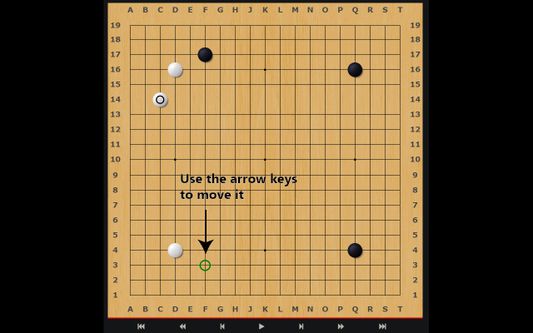
OGS keyboard navigation to the max.
1 người dùng1 người dùng
Siêu dữ liệu mở rộng
Ảnh chụp màn hình
Về tiện ích mở rộng này
PT-BR: Para falantes de português, assista ao tutorial aqui
Warning: I will not guarantee the Firefox version has the same quality standard of the Chromium ones.
Keyboard — better — navigation for OGS, the best online platform for playing the game of Go. Now, instead of only being able to play the ancient game online with your mouse, you can do it with your keyboard as well. Other handy shortcuts are also included.
This extension currently only works if you have all the coordinates turned on.
Please visit the homepage for a full table of shortcuts.
- Ctrl + \: Global switch: enables or disables the whole extension
- Ctrl + m: Toggle the chat input box on a game page
- Ctrl + b: Toggle the canvas overlay with the stone marker
- Ctrl + ]: Toggle the arrow keys
- w or ↑: Move the stone marker up
- a or ←: Move the stone marker left
- s or ↓: Move the stone marker down
- d or →: Move the stone marker right
- Enter or f: Click on the stone marker's location
- Ctrl + [: Pass
- Ctrl + ;: Toggle AI Analysis
- Ctrl + ,: Cycle through the different board sizes
- Ctrl + .: Toggle the coordinates input field
This is supposed to only work with the game pages on https://online-go.com. Reviewing games will not work as smoothly.
Được xếp hạng 0 (bởi 1 người dùng)
Quyền hạn và dữ liệu
Quyền hạn bắt buộc:
- Truy cập dữ liệu của bạn cho các trang web trong tên miền online-go.com
Thêm thông tin
- Liên kết tiện ích
- Phiên bản
- 1.0.2
- Kích cỡ
- 34,46 KB
- Cập nhật gần nhất
- 6 năm trước (6 Thg 01 2021)
- Thể loại có liên quan
- Giấy phép
- Giấy phép BSD 2-Clause "Simplified"
- Lịch sử các phiên bản
- Thêm vào bộ sưu tập
Nhà phát triển của tiện ích mở rộng này yêu cầu bạn giúp hỗ trợ sự phát triển liên tục của nó bằng cách đóng góp nhỏ.