Export Memrise Progress ავტორი neoncube
Export your Memrise community course's progress.
47 მომხმარებელი47 მომხმარებელი
გაფართოების მონაცემები
ეკრანის სურათები
გაფართოების შესახებ
This extension lets you save your Memrise community course's progress, so that you can import it into another site, such as mylittlewordland.com
To download your progress:
1. Go to https://community-courses.memrise.com
2. Open a course. You should now be on the course's overview page.
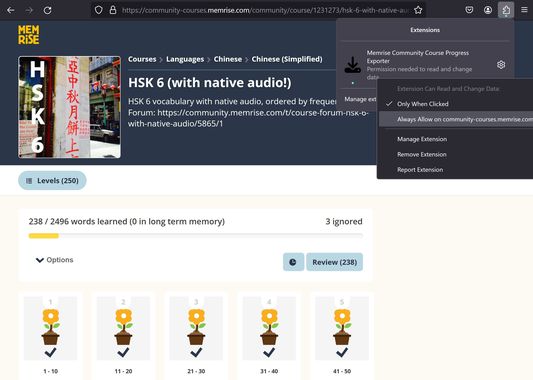
3. Click the Firefox extensions icon, right click the Memrise Community Course Progress Exporter extension, and select "Always Allow on community-courses.memrise.com" (See screenshot).
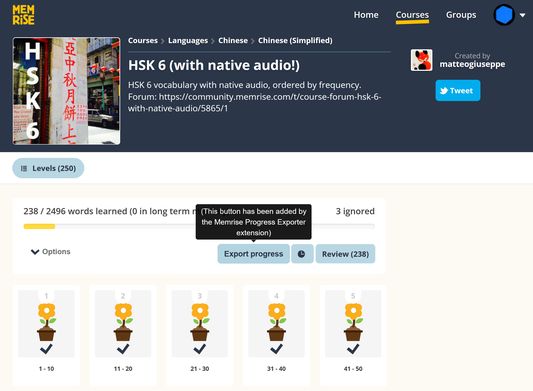
4. Click the blue "Export progress" button.
To download your progress:
1. Go to https://community-courses.memrise.com
2. Open a course. You should now be on the course's overview page.
3. Click the Firefox extensions icon, right click the Memrise Community Course Progress Exporter extension, and select "Always Allow on community-courses.memrise.com" (See screenshot).
4. Click the blue "Export progress" button.
0 შეფასება 0 მიმომხილველისგან
ნებართვები და მონაცემები
მოთხოვნილი ნებართვები:
- თქვენს მონაცემებთან წვდომა community-courses.memrise.com-ზე
- თქვენს მონაცემებთან წვდომა app.memrise.com-ზე
დამატებითი ნებართვები:
- თქვენს მონაცემებთან წვდომა community-courses.memrise.com-ზე
- თქვენს მონაცემებთან წვდომა app.memrise.com-ზე
დამატებითი მონაცემები
- დამატების ბმულები
- ვერსია
- 1.13
- ზომა
- 24,21 კბ
- ბოლო განახლება
- 2 დღის წინ (29 მაი 2026)
- მსგავსი კატეგორიები
- ლიცენზია
- All Rights Reserved (ყველა უფლება დაცულია)
- ვერსიის ისტორია
- კრებულში დამატება