PrivateSearch Patrik מאת
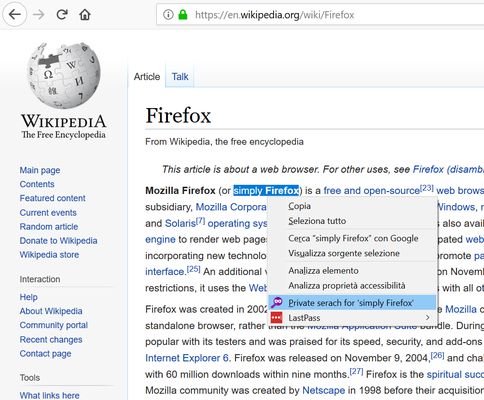
Search any text privately, with a simple right-click. The extension adds an option to the context menu to instantly open a search in a new private window, using your default search engine.
39 משתמשים39 משתמשים
נתוני העל של ההרחבה
צילומי מסך
על אודות הרחבה זו
How does it work?
1. Select the text you want to search
2. Right-click on the selected text
3. Select "Private search for..."
4. A new private window will open with the search results.
No data collected, no configuration needed.
⚠️ Important
To work properly, the extension requires the "Run in Private Windows" permission. Firefox will ask you to enable it during installation; you can also do it later from the extensions settings.
1. Select the text you want to search
2. Right-click on the selected text
3. Select "Private search for..."
4. A new private window will open with the search results.
No data collected, no configuration needed.
⚠️ Important
To work properly, the extension requires the "Run in Private Windows" permission. Firefox will ask you to enable it during installation; you can also do it later from the extensions settings.
מדורג 5 על־ידי 4 סוקרים
מידע נוסף
- גרסה
- 1.2resigned1
- גודל
- 22.47 ק״ב
- עדכון אחרון
- לפני שנתיים (26 אפר׳ 2024)
- קטגוריות קשורות
- רישיון
- כל הזכויות שמורות
- היסטוריית הגרסאות
- הוספה לאוסף