
Fellow από Fellow
Bring Fellow into Google Meet and Google Calendar
375 χρήστες375 χρήστες
Μεταδεδομένα επέκτασης
Στιγμιότυπα

Σχετικά με την επέκταση
📣 [NEW] Meeting Cost Calculator in Google Calendar 💵
Fellow’s free Chrome extension makes it easy for you to view your meeting cost so you can right-size your meetings.
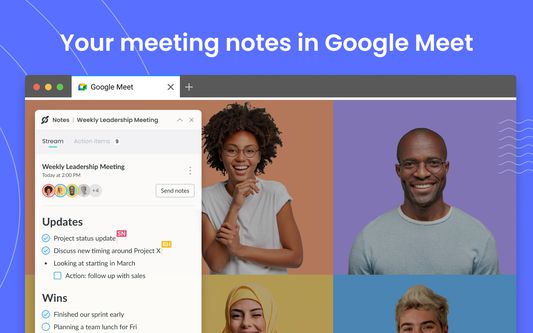
Fellow’s free Chrome extension also makes it easy to have your meeting notes right where you work. Improve your team meetings and one-on-ones, easily collaborate on meeting agendas, record action items, and stay on top of due dates - all without leaving the tools that you already use.
OVER 10 MILLION MEETING NOTES, 100+ COUNTRIES
Fellow is trusted by leaders at Fortune 500 and Unicorn companies such as Warner Media, Fanatics, Shopify and Aledade, to run productive meetings.
⭐️ ”I love that I can easily view Fellow when I am in Google meets with my Fellow Chrome extension. This saves me having too many windows open and leaves everything right at my fingertips.” - Charlotte M, Team Lead, in a G2 review.
KEY FEATURES
With a free Fellow account, you’ll have access to these key features:
- 🖊️ Collaborate on meeting agendas directly in Google Meet
- ✅ Build accountability with assigned action items
- 🗓️ Keep track of due dates directly in your Google Calendar
- 📬 Easily share the agenda with your meeting attendees
- 👨🏫 Apply expert-approved meeting templates
- 📷 Insert images, gifs, Google Drive files and more directly into your meeting notes
- 🏃♀️ Run effective 1-on-1s with a clear purpose, agenda, and outcome
-------
👩💻 GOOGLE MEET INTEGRATION
- Have your shared meeting agendas open automatically when you join your video call
- For unscheduled or ad-hoc calls, simply hit “Start a new meeting” to create a new note. You can then share the note with anyone on the call
- Collaboratively write meeting minutes and action items in real-time
- See your meeting attendees and notes, side-by-side with our intuitive overlay
- End the call with clear takeaways and action items to build accountability
🗓️ GOOGLE CALENDAR INTEGRATION
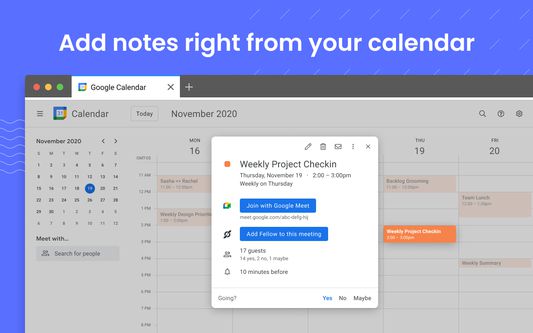
- Quickly open your notes by clicking on the button in your calendar event description
- Easily add discussion topics to your upcoming meetings and 1-on-1s by using the side panel
- Encourage your meeting attendees to collaborate on the agenda by including the link in the calendar invite
- See what tasks need to be completed with due date indicators on your calendar
- Make the notes easy to find by including a direct link to your meeting agenda in the calendar description.
🔐 SECURITY & PRIVACY
Fellow employs many security and industry best practices to ensure our product and systems stay secure. Highlights include SOC 2 Compliance, ongoing Vulnerability Scans, and Firewalls + Encryption on our Server Infrastructure. Read more here: https://help.fellow.app/en/articles/4302231-security-compliance
Learn more about Fellow and our other integrations at https://fellow.app
Fellow’s free Chrome extension makes it easy for you to view your meeting cost so you can right-size your meetings.
Fellow’s free Chrome extension also makes it easy to have your meeting notes right where you work. Improve your team meetings and one-on-ones, easily collaborate on meeting agendas, record action items, and stay on top of due dates - all without leaving the tools that you already use.
OVER 10 MILLION MEETING NOTES, 100+ COUNTRIES
Fellow is trusted by leaders at Fortune 500 and Unicorn companies such as Warner Media, Fanatics, Shopify and Aledade, to run productive meetings.
⭐️ ”I love that I can easily view Fellow when I am in Google meets with my Fellow Chrome extension. This saves me having too many windows open and leaves everything right at my fingertips.” - Charlotte M, Team Lead, in a G2 review.
KEY FEATURES
With a free Fellow account, you’ll have access to these key features:
- 🖊️ Collaborate on meeting agendas directly in Google Meet
- ✅ Build accountability with assigned action items
- 🗓️ Keep track of due dates directly in your Google Calendar
- 📬 Easily share the agenda with your meeting attendees
- 👨🏫 Apply expert-approved meeting templates
- 📷 Insert images, gifs, Google Drive files and more directly into your meeting notes
- 🏃♀️ Run effective 1-on-1s with a clear purpose, agenda, and outcome
-------
👩💻 GOOGLE MEET INTEGRATION
- Have your shared meeting agendas open automatically when you join your video call
- For unscheduled or ad-hoc calls, simply hit “Start a new meeting” to create a new note. You can then share the note with anyone on the call
- Collaboratively write meeting minutes and action items in real-time
- See your meeting attendees and notes, side-by-side with our intuitive overlay
- End the call with clear takeaways and action items to build accountability
🗓️ GOOGLE CALENDAR INTEGRATION
- Quickly open your notes by clicking on the button in your calendar event description
- Easily add discussion topics to your upcoming meetings and 1-on-1s by using the side panel
- Encourage your meeting attendees to collaborate on the agenda by including the link in the calendar invite
- See what tasks need to be completed with due date indicators on your calendar
- Make the notes easy to find by including a direct link to your meeting agenda in the calendar description.
🔐 SECURITY & PRIVACY
Fellow employs many security and industry best practices to ensure our product and systems stay secure. Highlights include SOC 2 Compliance, ongoing Vulnerability Scans, and Firewalls + Encryption on our Server Infrastructure. Read more here: https://help.fellow.app/en/articles/4302231-security-compliance
Learn more about Fellow and our other integrations at https://fellow.app
Βαθμολογήθηκε με 0 από 0 αξιολογητές
Δικαιώματα και δεδομένα
Απαιτούμενα δικαιώματα:
- Πρόσβαση στα δεδομένα σας για ιστοτόπους του τομέα fellow.app
- Πρόσβαση στα δεδομένα σας για ιστοτόπους του τομέα fellow.co
- Πρόσβαση στα δεδομένα σας για meet.google.com
- Πρόσβαση στα δεδομένα σας για calendar.google.com
Περισσότερες πληροφορίες
- Σύνδεσμοι προσθέτου
- Έκδοση
- 2.8.6
- Μέγεθος
- 988,35 KB
- Τελευταία ενημέρωση
- 2 μήνες πριν (10 Φεβ 2026)
- Σχετικές κατηγορίες
- Άδεια
- Με την επιφύλαξη παντός δικαιώματος
- Πολιτική απορρήτου
- Διαβάστε την πολιτική απορρήτου του προσθέτου
- Ιστορικό εκδόσεων
- Προσθήκη σε συλλογή