
Convert Case από Convert Case Ltd
Μετατρέψτε κείμενο στον περιηγητή σε ΚΕΦΑΛΑΙΑ, πεζά και άλλα.
811 χρήστες811 χρήστες
Μεταδεδομένα επέκτασης
Στιγμιότυπα
Σχετικά με την επέκταση
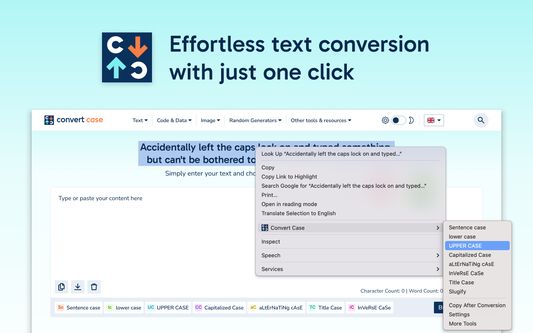
Βαρεθήκατε να πληκτρολογείτε ξανά κείμενο μόνο για να αλλάξετε πεζά/κεφαλαία; Επιλέξτε κείμενο οπουδήποτε στον περιηγητή σας, κάντε δεξί κλικ και μετατρέψτε το αμέσως – χωρίς αντιγραφή-επικόλληση σε εξωτερικά εργαλεία.
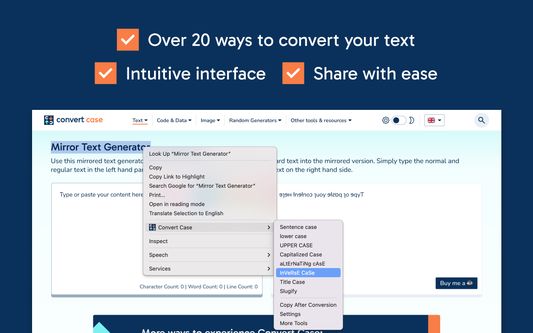
Το Convert Case είναι ένας γρήγορος, ελαφρύς μετατροπέας πεζών/κεφαλαίων με 16 μετατροπές, συντομεύσεις πληκτρολογίου, αυτόματη αντιγραφή στο πρόχειρο και πλήρη μετάφραση της διεπαφής σε 15 γλώσσες. Αλλάξτε πεζά/κεφαλαία απευθείας στον περιηγητή – επιλέξτε, δεξί κλικ, τέλος. Δουλεύει σε κανονικές ιστοσελίδες, Google Docs, Reddit και άλλα.
Μετατροπές γραφής
ΚΕΦΑΛΑΙΑ, πεζά, Τίτλος, Πρόταση, Κάθε Λέξη Με Κεφαλαίο, Χωρίς τόνους
Μετατροπές προγραμματιστή
camelCase, PascalCase, snake_case, CONSTANT_CASE, param-case (slugify), dot.case, path/case
Μετατροπές χρησιμότητας
eΝαΛλΑσΣοΜεΝα, αΝΤΊΣΤΡΟΦΑ, Χωρίς μορφοποίηση (απλές πεζές λέξεις)
Χαρακτηριστικά
- Αλλαγή πεζών/κεφαλαίων επί τόπου μέσω μενού δεξιού κλικ
- Συντομεύσεις πληκτρολογίου για γρήγορη πρόσβαση (Alt+U, Alt+L, Alt+C, Alt+A) – ή ορίστε τις δικές σας
- Αντιγραφή μετά τη μετατροπή – αντιγράφει αυτόματα το μετατραπέν κείμενο στο πρόχειρο
- Αυτόματη σωστή γραφή κυρίων ονομάτων σε Τίτλο, Πρόταση και Κάθε Λέξη Με Κεφαλαίο – χιλιάδες ονόματα, τοποθεσίες, μάρκες και ακρωνύμια αναγνωρίζονται και γράφονται σωστά (Παρίσι, IBM, Abu Dhabi, iOS) – απενεργοποιήστε την ή προσθέστε δικούς σας όρους στις Ρυθμίσεις
- Υπομενού Μετρήσεων με ζωντανή καταμέτρηση χαρακτήρων, λέξεων, προτάσεων και γραμμών της επιλογής
- Ρυθμιζόμενες επιλογές Τίτλου (αγνοήστε λέξεις όπως "ο", "και", "του")
Λειτουργεί με
Google Docs (Shift+δεξί κλικ ή συντόμευση πληκτρολογίου), Reddit, Disqus, επεξεργαστές WYSIWYG, TinyMCE και περιεχόμενο βασισμένο σε iframe.
Απόρρητο
Όλες οι μετατροπές εκτελούνται τοπικά στη συσκευή σας. Το Convert Case δεν συλλέγει, μεταδίδει ή αποθηκεύει οποιαδήποτε δεδομένα χρήστη.
Γλώσσες
English, British English, Deutsch, Ελληνικά, Español, Filipino, Français, हिन्दी, Magyar, Italiano, Polski, Português, Slovenščina, Türkçe, Українська. Ακολουθεί αυτόματα τη γλώσσα του περιηγητή· μπορεί να παρακαμφθεί στις Ρυθμίσεις.
Ιστορικό αλλαγών
- 2.3.0 - Νέα ρύθμιση «Κύρια Ονόματα» αντικαθιστά τις Αγνοημένες και Σωστές Λέξεις· ενεργοποιήστε ή απενεργοποιήστε την αυτόματη διόρθωση των ενσωματωμένων κυρίων ονομάτων και συντομογραφιών, και προσθέστε δικούς σας όρους των οποίων η γραφή υπερισχύει της ενσωματωμένης λίστας
- 2.2.0 - Μεταφράστηκε σε 15 γλώσσες (English, British English, Deutsch, Ελληνικά, Español, Filipino, Français, हिन्दी, Magyar, Italiano, Polski, Português, Slovenščina, Türkçe, Українська)· ακολουθεί αυτόματα τη γλώσσα του περιηγητή, με δυνατότητα παράκαμψης στις Ρυθμίσεις
Το Convert Case είναι ένας γρήγορος, ελαφρύς μετατροπέας πεζών/κεφαλαίων με 16 μετατροπές, συντομεύσεις πληκτρολογίου, αυτόματη αντιγραφή στο πρόχειρο και πλήρη μετάφραση της διεπαφής σε 15 γλώσσες. Αλλάξτε πεζά/κεφαλαία απευθείας στον περιηγητή – επιλέξτε, δεξί κλικ, τέλος. Δουλεύει σε κανονικές ιστοσελίδες, Google Docs, Reddit και άλλα.
Μετατροπές γραφής
ΚΕΦΑΛΑΙΑ, πεζά, Τίτλος, Πρόταση, Κάθε Λέξη Με Κεφαλαίο, Χωρίς τόνους
Μετατροπές προγραμματιστή
camelCase, PascalCase, snake_case, CONSTANT_CASE, param-case (slugify), dot.case, path/case
Μετατροπές χρησιμότητας
eΝαΛλΑσΣοΜεΝα, αΝΤΊΣΤΡΟΦΑ, Χωρίς μορφοποίηση (απλές πεζές λέξεις)
Χαρακτηριστικά
- Αλλαγή πεζών/κεφαλαίων επί τόπου μέσω μενού δεξιού κλικ
- Συντομεύσεις πληκτρολογίου για γρήγορη πρόσβαση (Alt+U, Alt+L, Alt+C, Alt+A) – ή ορίστε τις δικές σας
- Αντιγραφή μετά τη μετατροπή – αντιγράφει αυτόματα το μετατραπέν κείμενο στο πρόχειρο
- Αυτόματη σωστή γραφή κυρίων ονομάτων σε Τίτλο, Πρόταση και Κάθε Λέξη Με Κεφαλαίο – χιλιάδες ονόματα, τοποθεσίες, μάρκες και ακρωνύμια αναγνωρίζονται και γράφονται σωστά (Παρίσι, IBM, Abu Dhabi, iOS) – απενεργοποιήστε την ή προσθέστε δικούς σας όρους στις Ρυθμίσεις
- Υπομενού Μετρήσεων με ζωντανή καταμέτρηση χαρακτήρων, λέξεων, προτάσεων και γραμμών της επιλογής
- Ρυθμιζόμενες επιλογές Τίτλου (αγνοήστε λέξεις όπως "ο", "και", "του")
Λειτουργεί με
Google Docs (Shift+δεξί κλικ ή συντόμευση πληκτρολογίου), Reddit, Disqus, επεξεργαστές WYSIWYG, TinyMCE και περιεχόμενο βασισμένο σε iframe.
Απόρρητο
Όλες οι μετατροπές εκτελούνται τοπικά στη συσκευή σας. Το Convert Case δεν συλλέγει, μεταδίδει ή αποθηκεύει οποιαδήποτε δεδομένα χρήστη.
Γλώσσες
English, British English, Deutsch, Ελληνικά, Español, Filipino, Français, हिन्दी, Magyar, Italiano, Polski, Português, Slovenščina, Türkçe, Українська. Ακολουθεί αυτόματα τη γλώσσα του περιηγητή· μπορεί να παρακαμφθεί στις Ρυθμίσεις.
Ιστορικό αλλαγών
- 2.3.0 - Νέα ρύθμιση «Κύρια Ονόματα» αντικαθιστά τις Αγνοημένες και Σωστές Λέξεις· ενεργοποιήστε ή απενεργοποιήστε την αυτόματη διόρθωση των ενσωματωμένων κυρίων ονομάτων και συντομογραφιών, και προσθέστε δικούς σας όρους των οποίων η γραφή υπερισχύει της ενσωματωμένης λίστας
- 2.2.0 - Μεταφράστηκε σε 15 γλώσσες (English, British English, Deutsch, Ελληνικά, Español, Filipino, Français, हिन्दी, Magyar, Italiano, Polski, Português, Slovenščina, Türkçe, Українська)· ακολουθεί αυτόματα τη γλώσσα του περιηγητή, με δυνατότητα παράκαμψης στις Ρυθμίσεις
Βαθμολογήθηκε με 4,6 από 15 αξιολογητές
Δικαιώματα και δεδομένα
Απαιτούμενα δικαιώματα:
- Έχει πρόσβαση στις καρτέλες περιήγησης
- Έχει πρόσβαση στα δεδομένα σας για κάθε ιστότοπο
Συλλογή δεδομένων:
- Ο δημιουργός δηλώνει ότι αυτή η επέκταση δεν απαιτεί συλλογή δεδομένων.
Περισσότερες πληροφορίες
- Σύνδεσμοι προσθέτου
- Έκδοση
- 2.3.0
- Μέγεθος
- 88,16 KB
- Τελευταία ενημέρωση
- 5 μέρες πριν (20 Απρ 2026)
- Σχετικές κατηγορίες
- Άδεια
- Με την επιφύλαξη παντός δικαιώματος
- Ιστορικό εκδόσεων
- Προσθήκη σε συλλογή
Ο προγραμματιστής της επέκτασης σάς ζητά να βοηθήσετε τη συνεχή ανάπτυξή της με μια μικρή συνεισφορά.