
TabTamer 作成者: mcortt
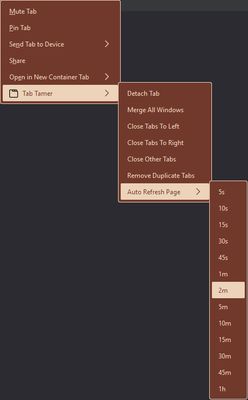
Close tabs left, right, other, close duplicate tabs, detach tab(s), merge windows, auto-refresh tab maximize windows on startup and/or creation.
2 人のユーザー2 人のユーザー
拡張機能メタデータ
スクリーンショット

この拡張機能について
<ul>
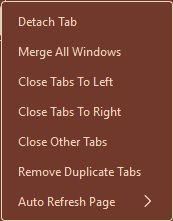
<li><b>Context-menu and keyboard shortcuts to:</b>
<ul>
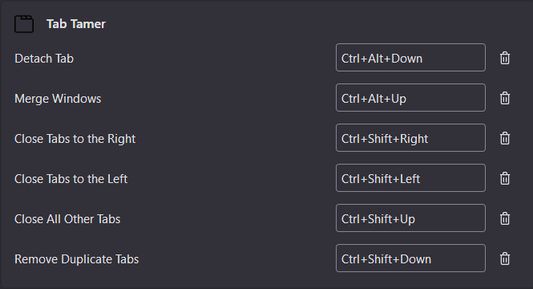
<li>Close all tabs to the left (<strong>Ctrl+Shift+LeftArrow</strong>)</li>
<li>Close all tabs to the right (<strong>Ctrl+Shift+RightArrow</strong>)</li>
<li>Close all other tabs (<strong>Ctrl+Shift+UpArrow</strong>)</li>
<li>Close all duplicate tabs (<strong>Ctrl+Shift+DownArrow</strong>)</li>
<li>Detach current tab(s) to new window (<strong>Ctrl+Alt+DownArrow</strong>)</li>
<li>Merge all windows into a single window (<strong>Ctrl+Alt+UpArrow</strong>)</li>
<li>Auto-refresh tabs (context-menu only)
<ul>
<li><i>URLbar Page Action: If you have set auto-refresh, there will be a page action button shown in the URLbar. Clicking it will cease the auto-refresh for that tab.</i></li>
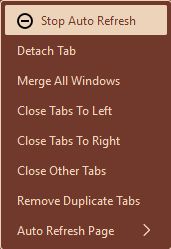
<li><i>Dynamic Context-Menu Option: If auto-refresh is set for the current tab, you can cancel it by going into TabTamer's context-menu and click the option "Stop Auto Refresh" with the icon beside it.</i></li>
</ul>
</li>
</ul>
</li>
</ul>
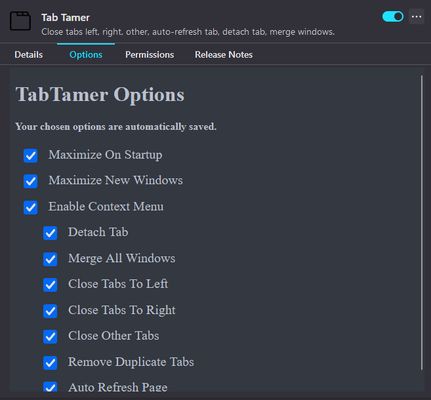
<b>Options:</b>
<ul>
<li>Maximize windows on startup and/or creation</li>
<li>Customize context-menu</li>
</ul>
<li><b>Context-menu and keyboard shortcuts to:</b>
<ul>
<li>Close all tabs to the left (<strong>Ctrl+Shift+LeftArrow</strong>)</li>
<li>Close all tabs to the right (<strong>Ctrl+Shift+RightArrow</strong>)</li>
<li>Close all other tabs (<strong>Ctrl+Shift+UpArrow</strong>)</li>
<li>Close all duplicate tabs (<strong>Ctrl+Shift+DownArrow</strong>)</li>
<li>Detach current tab(s) to new window (<strong>Ctrl+Alt+DownArrow</strong>)</li>
<li>Merge all windows into a single window (<strong>Ctrl+Alt+UpArrow</strong>)</li>
<li>Auto-refresh tabs (context-menu only)
<ul>
<li><i>URLbar Page Action: If you have set auto-refresh, there will be a page action button shown in the URLbar. Clicking it will cease the auto-refresh for that tab.</i></li>
<li><i>Dynamic Context-Menu Option: If auto-refresh is set for the current tab, you can cancel it by going into TabTamer's context-menu and click the option "Stop Auto Refresh" with the icon beside it.</i></li>
</ul>
</li>
</ul>
</li>
</ul>
<b>Options:</b>
<ul>
<li>Maximize windows on startup and/or creation</li>
<li>Customize context-menu</li>
</ul>
2 人のレビュー担当者が 2.5 と評価しました
権限とデータ
詳しい情報
- バージョン
- 1.4.7
- サイズ
- 13.72 KB
- 最終更新日
- 2ヶ月前 (2026年1月21日)
- 関連カテゴリー
- プライバシーポリシー
- このアドオンのプライバシーポリシーを読む
- バージョン履歴
- コレクションへ追加