Retainer 作成者: Roy Orbitson
Provides a keyboard shortcut (Shift + Alt + C by default) to create a new tab that retains the current/last-used container.
34 Users34 Users
拡張機能メタデータ
スクリーンショット
この拡張機能について
This is an updated and improved version of https://addons.mozilla.org/en-US/firefox/addon/new-container-tab/
It provides a keyboard shortcut (Shift + Alt + C by default) to create a new tab that retains the current/last-used container.
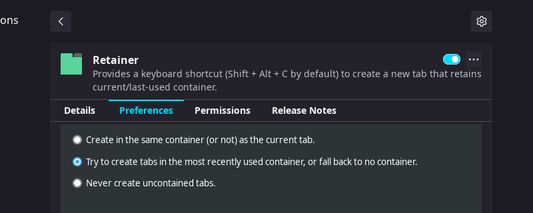
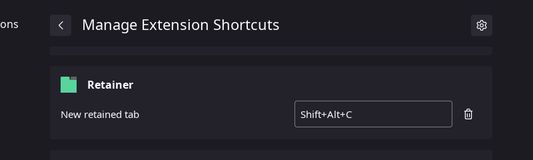
You can edit the default shortcut under Add-ons and Themes > Extensions > ⚙️ > Manage Extension Shortcuts > Retainer. New tabs can be restricted to the last-used container in the extension's preferences panel under Add-ons and Themes > Extensions > Retainer > ⋯ > Preferences.
It provides a keyboard shortcut (Shift + Alt + C by default) to create a new tab that retains the current/last-used container.
You can edit the default shortcut under Add-ons and Themes > Extensions > ⚙️ > Manage Extension Shortcuts > Retainer. New tabs can be restricted to the last-used container in the extension's preferences panel under Add-ons and Themes > Extensions > Retainer > ⋯ > Preferences.
Rated 5 by 5 reviewers
Permissions and data
詳しい情報
- バージョン
- 0.2.1
- サイズ
- 17.12 KB
- 最終更新日
- 4年前 (2022年1月17日)
- 関連カテゴリー
- プライバシーポリシー
- このアドオンのプライバシーポリシーを読む
- バージョン履歴
- コレクションへ追加