
OGS Kbd Nav 作成者: Fanaro009
OGS keyboard navigation to the max.
1 人のユーザー1 人のユーザー
拡張機能メタデータ
スクリーンショット

この拡張機能について
PT-BR: Para falantes de português, assista ao tutorial aqui
Warning: I will not guarantee the Firefox version has the same quality standard of the Chromium ones.
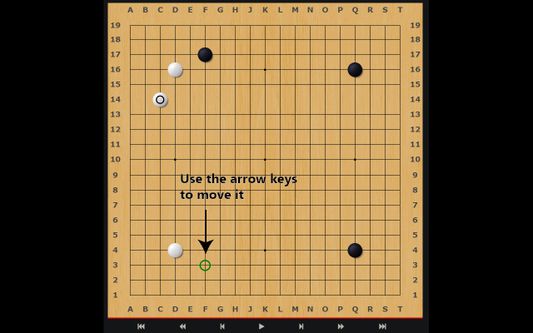
Keyboard — better — navigation for OGS, the best online platform for playing the game of Go. Now, instead of only being able to play the ancient game online with your mouse, you can do it with your keyboard as well. Other handy shortcuts are also included.
This extension currently only works if you have all the coordinates turned on.
Please visit the homepage for a full table of shortcuts.
- Ctrl + \: Global switch: enables or disables the whole extension
- Ctrl + m: Toggle the chat input box on a game page
- Ctrl + b: Toggle the canvas overlay with the stone marker
- Ctrl + ]: Toggle the arrow keys
- w or ↑: Move the stone marker up
- a or ←: Move the stone marker left
- s or ↓: Move the stone marker down
- d or →: Move the stone marker right
- Enter or f: Click on the stone marker's location
- Ctrl + [: Pass
- Ctrl + ;: Toggle AI Analysis
- Ctrl + ,: Cycle through the different board sizes
- Ctrl + .: Toggle the coordinates input field
This is supposed to only work with the game pages on https://online-go.com. Reviewing games will not work as smoothly.
0 人のレビュー担当者が 0 と評価しました
権限とデータ
詳しい情報
- バージョン
- 1.0.2
- サイズ
- 34.46 KB
- 最終更新日
- 6年前 (2021年1月6日)
- 関連カテゴリー
- ライセンス
- 2条項簡易 BSD ライセンス
- バージョン履歴
- コレクションへ追加