
Next Page X 作成者: Tom
Use the shortcut keys to move to the next page.
1 User1 User
拡張機能メタデータ
スクリーンショット
この拡張機能について
Use the shortcut keys to move to the next page.
Explanation.
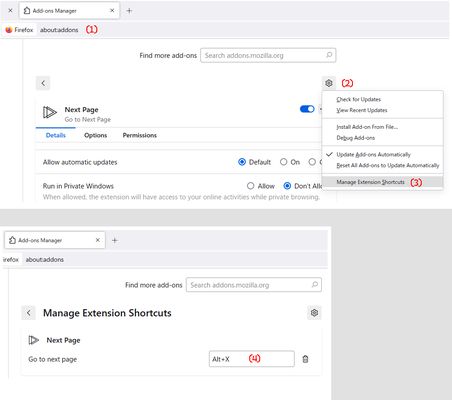
The first step is to set the shortcut keys.
Access to about:addons, addons page , Ctrl + Shift + A.
Click to addon tool button and setting shortcut key (S).
Default is Alt + X. But not optimal for many people.
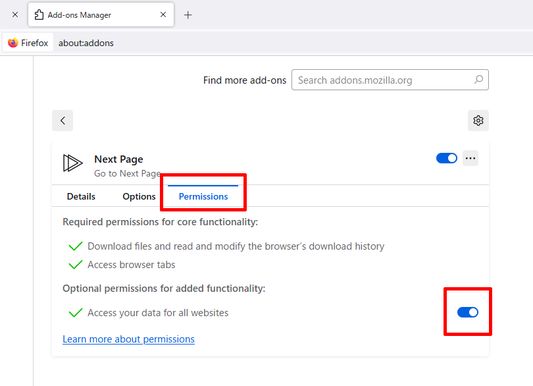
Next, open the extension permissions.
Check the permissions.
Open the extension options.
The regex try to increment the page number by + 1 for the next page.
Format is
(Front $1)(page number $x)(Back $x + 1) $x is next form
Example
https://developer.mozilla.org/ja/search?q=html&page=2
https://github.com/abc?p=12
https://abc.com/abc/page/2/
(https://.+(\?|&|/)(p|page)(=|/))([0-9]+)(.*) : next form in 5
Next. url, xpath
You need the URL and the XPath of the element containing the link (href attribute)
to the page you want to navigate.
Example
https://developer.mozilla.org/en-US/search?q=addon
to
https://developer.mozilla.org/en-US/search?q=, //ul[contains(@class, "pagination")] / li / a[last()][contains(text(),"Next")]
If necessary, you can use https:// , //a[contains(text(),"Next")]
but to avoid issues, it is recommended to write the URL up to the trailing slash after the domain, like https://x.xx/.
Please use the Import and Export buttons to work in the editor.
Sample
https://developer.mozilla.org/ , //ul[contains(@class, "pagination")] / li / a[last()][contains(text(),"Next")]
https://www.bing.com/search? , //nav[@role="navigation"] /ul / li /a[contains(@class, "sb_pagN")]
https://www.google.com/search?q= , //a[@id="pnnext"]
https://search.yahoo.com/ , //div[contains(@class, "pagination")]
Explanation.
The first step is to set the shortcut keys.
Access to about:addons, addons page , Ctrl + Shift + A.
Click to addon tool button and setting shortcut key (S).
Default is Alt + X. But not optimal for many people.
Next, open the extension permissions.
Check the permissions.
Open the extension options.
The regex try to increment the page number by + 1 for the next page.
Format is
(Front $1)(page number $x)(Back $x + 1) $x is next form
Example
https://developer.mozilla.org/ja/search?q=html&page=2
https://github.com/abc?p=12
https://abc.com/abc/page/2/
(https://.+(\?|&|/)(p|page)(=|/))([0-9]+)(.*) : next form in 5
Next. url, xpath
You need the URL and the XPath of the element containing the link (href attribute)
to the page you want to navigate.
Example
https://developer.mozilla.org/en-US/search?q=addon
to
https://developer.mozilla.org/en-US/search?q=, //ul[contains(@class, "pagination")] / li / a[last()][contains(text(),"Next")]
If necessary, you can use https:// , //a[contains(text(),"Next")]
but to avoid issues, it is recommended to write the URL up to the trailing slash after the domain, like https://x.xx/.
Please use the Import and Export buttons to work in the editor.
Sample
https://developer.mozilla.org/ , //ul[contains(@class, "pagination")] / li / a[last()][contains(text(),"Next")]
https://www.bing.com/search? , //nav[@role="navigation"] /ul / li /a[contains(@class, "sb_pagN")]
https://www.google.com/search?q= , //a[@id="pnnext"]
https://search.yahoo.com/ , //div[contains(@class, "pagination")]
Rated 0 by 0 reviewers
Permissions and data
詳しい情報
- バージョン
- 4
- サイズ
- 18.56 KB
- 最終更新日
- 8ヶ月前 (2025年4月8日)
- 関連カテゴリー
- バージョン履歴
- コレクションへ追加