Firefox böngészőkiegészítők
  • Kiegészítők
  • Témák
    • Firefoxhoz
    • Szótárak és nyelvi csomagok
    • Más böngészők oldalai
    • Kiegészítők Androidra
Bejelentkezés
REtoUN előnézete

REtoUN szerző: DBSH

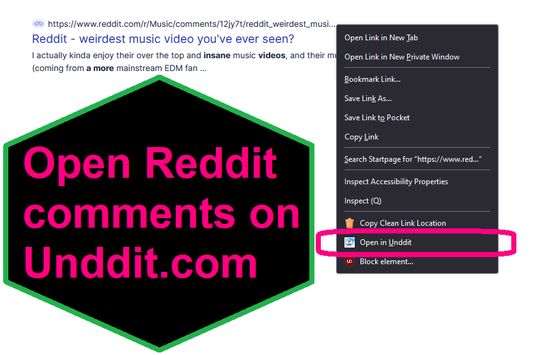
EXTENSION IS DEPRECATED - SEE ABOUT THIS EXTENSION BELOW FOR MORE DETAIL A simple extension that adds an option to the context menu to open links to Reddit comments on unddit.com instead, in a new tab.

0 (0 értékelés)0 (0 értékelés)
2 felhasználó2 felhasználó
A Firefox letöltése és a kiegészítő beszerzése
Fájl letöltése

Kiegészítő metaadatai

Képernyőképek
A kiegészítő névjegye
EXTENSION IS DEPRECATED. NOTES: https://www.unddit.com is gone, and its existence was necessary for this extension to function. I am leaving this extension published for educational purposes (someone may want to use the source for a similar use case where an option in the context menu links to a re-written URL)

This is for those who prefer to read Reddit comments on https://www.unddit.com - maybe you prefer to see deleted comments, or maybe you think "continue this thread" is a crime against UI.
To use, right-click on a link to a Reddit post, and choose Open in Unddit from the context menu. If the link to the Reddit post is https://www.reddit.com/r/news/comments/130kndv for example, using REtoUN will open https://www.unddit.com/r/news/comments/130kndv instead, in a new tab.
Fejlesztői megjegyzések
Note that in Firefox, content on https://www.unddit.com requires turning off Enhanced Tracking Protection to load. This behavior is not at all related to this extension.

Developer is not affiliated with Unddit.com, but is a huge fan of the project.

To view this extension's source code:
1. In a Firefox instance that already has this extension installed, type about:profiles in the Firefox address bar, then press Enter
2. Under the profile labeled This is the profile in use and it cannot be deleted, click on the Open Directory button (appears as Open Folder on Windows) next to Root Directory
3. In the file explorer window that opens, go into the extensions directory (the extensions folder)
4. Copy the file {d40ec1bd-9875-4dbd-a1f7-cba6e2d9d281}.xpi and paste it somewhere else, such as your Desktop
5. Rename the file you just pasted, changing the extension to .zip - so {d40ec1bd-9875-4dbd-a1f7-cba6e2d9d281}.xpi becomes {d40ec1bd-9875-4dbd-a1f7-cba6e2d9d281}.zip
6. Unzip the file {d40ec1bd-9875-4dbd-a1f7-cba6e2d9d281}.zip. The extracted files are the source, especially the .json and .js files.
Értékelés 0 szerkesztő által: 0
Jelentkezzen be a kiegészítő értékeléséhez
Még nincsenek csillagos értékelések

Csillagos értékelés mentve

5
0
4
0
3
0
2
0
1
0
Még nincsenek értékelések
Engedélyek és adatok

Szükséges engedélyek:

  • Böngészőlapok elérése
További tudnivalók
További információk
Verzió
1.0
Méret
26,31 kB
Legutóbb frissítve
3 éve (2023. ápr. 27.)
Kapcsolódó kategóriák
  • Hírcsatornák, hírek és blogolás
  • Adatvédelem és biztonság
  • Közösség és kommunikáció
Licenc
Kizárólag GNU GPL licenc v3.0
Adatvédelmi irányelvek
Olvassa el a kiegészítő adatvédelmi irányelveit
Verziótörténet
  • Összes verzió megtekintése
Gyűjteményhez adás
Kiegészítő jelentése
Ugrás a Mozilla honlapjára

Kiegészítők

  • Névjegy
  • Firefox kiegészítők blogja
  • Kiegészítő-műhely
  • Fejlesztőközpont
  • Fejlesztői irányelvek
  • Közösségi blog
  • Fórum
  • Hiba jelentése
  • Értékelési útmutató

Böngészők

  • Desktop
  • Mobile
  • Enterprise

Termékek

  • Browsers
  • VPN
  • Relay
  • Monitor
  • Pocket
  • Bluesky (@firefox.com)
  • Instagram (Firefox)
  • YouTube (firefoxchannel)
  • Adatvédelem
  • Sütik
  • Jogi információk

Kivéve, ahol másként van jelölve, az oldal tartalma Creative Commons Nevezd meg! – Így add tovább! licenc v3.0 vagy bármelyik újabb verziója alatt érhető el.