WarpDrive-ff Krithik Rao מאת
This extension allows jumping to custom urls using specified keywords, all through the omnibar! Based on the zsh extension `wd`.
משתמש אחדמשתמש אחד
נתוני העל של ההרחבה
צילומי מסך
על אודות הרחבה זו
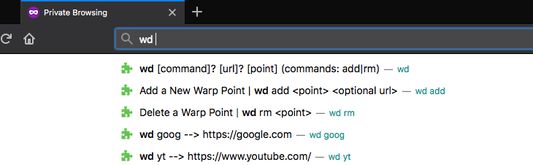
This add on is interacted with in the omnibar with the three following commands.
Example usage is as follows.
- Typing `wd add news cnn.org` or just `wd add news` on the cnn.org page, adds a custom shortcut to cnn.
- You can later come back to it by typing `wd news`.
- If you ever want to remove this shortcut, `wd rm news` does the trick.
All your warp points are synced across your devices if you're logged into a firefox account.
- `wd add <point> <url>` To specify a keyword for the current page or specified url.
- `wd remove <point>` To remove a keyword linked to a url.
- `wd <point>` To go to the url associated with a keyword
- `wd list` To get a popup or window with all saved shortcuts
Example usage is as follows.
- Typing `wd add news cnn.org` or just `wd add news` on the cnn.org page, adds a custom shortcut to cnn.
- You can later come back to it by typing `wd news`.
- If you ever want to remove this shortcut, `wd rm news` does the trick.
All your warp points are synced across your devices if you're logged into a firefox account.
מדורג 0 על־ידי 0 סוקרים
הרשאות ונתונים
מידע נוסף
- קישורים לתוספת
- גרסה
- 1.5resigned1
- גודל
- 60.27 ק״ב
- עדכון אחרון
- לפני שנתיים (25 אפר׳ 2024)
- רישיון
- MIT License
- היסטוריית הגרסאות
- הוספה לאוסף