Slack App-in-Tab Reborn Axel Leroy מאת
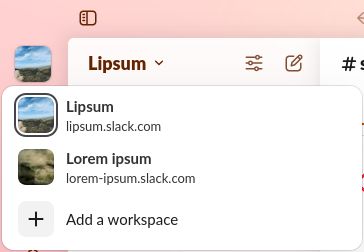
Open the Slack app with its multi-workspace sidebar in a simple browser tab, freeing you from using the Slack app!
אין משתמשיםאין משתמשים
נתוני העל של ההרחבה
צילומי מסך
על אודות הרחבה זו
Slack App-in-Tab Reborn is a fork of "Slack App-in-Tab" which has unfortunately stopped working. This version keeps the same functionality as the original.
How to use
How does it work?
Slack App-in-Tab Reborn changes how Firefox presents itself to Slack so it believes you are browsing from a Chromebook. Since Chromebooks can't run the Slack app, it then shows the workspace switcher as it does in the app.
How to use
- Install the extension
- Visit https://app.slack.com and log into any of your workspaces
- That's it, all your workspaces appear in the sidebar, just like in the Slack App
How does it work?
Slack App-in-Tab Reborn changes how Firefox presents itself to Slack so it believes you are browsing from a Chromebook. Since Chromebooks can't run the Slack app, it then shows the workspace switcher as it does in the app.
Access to slack.com is required in order to change the User-Agent (the way Firefox presents itself to Slack)
מדורג 0 על־ידי 0 סוקרים
הרשאות ונתונים
הרשאות נדרשות:
- גישה ללשוניות
- גישה לנתונים שלך עבור אתרים תחת שם המתחם slack.com
איסוף נתונים:
- המפתח אומר שהרחבה זו אינה דורשת איסוף נתונים.
מידע נוסף
- קישורים לתוספת
- גרסה
- 2025.11.22
- גודל
- 24.24 ק״ב
- עדכון אחרון
- לפני חודש (22 נוב׳ 2025)
- קטגוריות קשורות
- היסטוריית הגרסאות
- הוספה לאוסף