Salesforce Id CopyPasteGo Danny Summerlin מאת
Copy the current Salesforce record's ID to the clipboard, or paste your way to the record's page from where you are!
16 משתמשים16 משתמשים
נתוני העל של ההרחבה
צילומי מסך
על אודות הרחבה זו
Navigate Salesforce records by ID with keyboard shortcuts and the right-click menu:
- Alt+Shift+C copies the current page's cleaned up URL
- Alt+Ctrl+C copies the current page's record ID
- Alt+Ctrl+V opens the record page for the ID on your clipboard (copied from any source)
- Alt+Ctrl+B opens the record page for the ID on your clipboard in a new tab
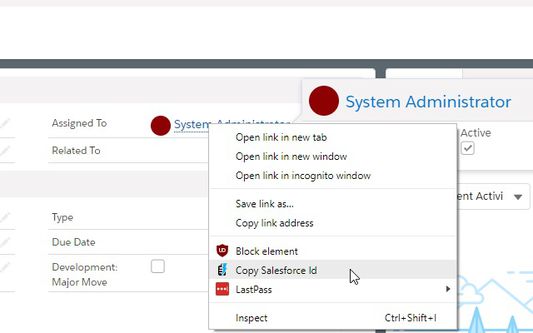
- Right click on any Salesforce link to copy just the Salesforce ID from it or grab a clean version of the URL
This extension works with Classic and Lightning interfaces
- Alt+Shift+C copies the current page's cleaned up URL
- Alt+Ctrl+C copies the current page's record ID
- Alt+Ctrl+V opens the record page for the ID on your clipboard (copied from any source)
- Alt+Ctrl+B opens the record page for the ID on your clipboard in a new tab
- Right click on any Salesforce link to copy just the Salesforce ID from it or grab a clean version of the URL
This extension works with Classic and Lightning interfaces
מדורג 0 על־ידי 0 סוקרים
הרשאות ונתונים
הרשאות נדרשות:
- קבלת נתונים מלוח העריכה
- הזנת נתונים בלוח העריכה
- גישה לנתונים שלך עבור אתרים תחת שם המתחם force.com
- גישה לנתונים שלך עבור אתרים תחת שם המתחם salesforce.com
- גישה לנתונים שלך עבור אתרים תחת שם המתחם cloudforce.com
מידע נוסף
- גרסה
- 1.4.10resigned1
- גודל
- 18.4 ק״ב
- עדכון אחרון
- לפני שנתיים (26 אפר׳ 2024)
- קטגוריות קשורות
- רישיון
- MIT License
- היסטוריית הגרסאות
- הוספה לאוסף