Mantis Helper Michael Fiedler מאת
Mantis Helper is a browser extension that streamlines your bug tracking workflow. Select an issue number on any webpage, right-click, and choose 'Open in Mantis' to view it in a new tab. Customizable Mantis URL via options UI.
משתמש אחדמשתמש אחד
נתוני העל של ההרחבה
צילומי מסך
על אודות הרחבה זו
Overview:
Mantis Helper is a browser extension that adds a contextual menu option for quickly opening issue numbers in Mantis, a popular bug tracking system. The extension aims to streamline your workflow by enabling you to navigate directly to Mantis issues from any webpage where an issue number is displayed.
Features:
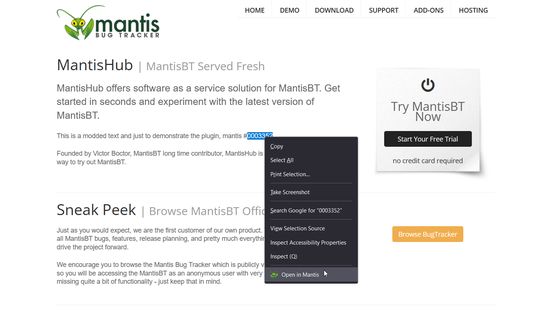
Context Menu Integration: Select a number (issue ID) on any webpage, right-click, and choose "Open in Mantis" to open the relevant issue in a new tab.
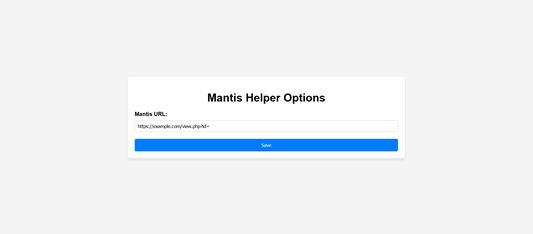
Custom Mantis URL: Configure your specific Mantis instance URL through the options UI.
Permissions
The extension requires the following permissions:
Context Menus: To add the "Open in Mantis" option to the browser's right-click menu.
Storage: To save the custom Mantis URL that you set in the options.
How to Use:
Installation: Download and install the extension.
Configuration: Go to the extension options (Settings > Extensions > Mantis Helper > Options) and input your Mantis URL if it's different from the default.
Usage: Highlight any issue number on a webpage, right-click, and select "Open in Mantis".
Mantis Helper is a browser extension that adds a contextual menu option for quickly opening issue numbers in Mantis, a popular bug tracking system. The extension aims to streamline your workflow by enabling you to navigate directly to Mantis issues from any webpage where an issue number is displayed.
Features:
Context Menu Integration: Select a number (issue ID) on any webpage, right-click, and choose "Open in Mantis" to open the relevant issue in a new tab.
Custom Mantis URL: Configure your specific Mantis instance URL through the options UI.
Permissions
The extension requires the following permissions:
Context Menus: To add the "Open in Mantis" option to the browser's right-click menu.
Storage: To save the custom Mantis URL that you set in the options.
How to Use:
Installation: Download and install the extension.
Configuration: Go to the extension options (Settings > Extensions > Mantis Helper > Options) and input your Mantis URL if it's different from the default.
Usage: Highlight any issue number on a webpage, right-click, and select "Open in Mantis".
מדורג 0 על־ידי 0 סוקרים
הרשאות ונתונים
מידע נוסף
- קישורים לתוספת
- גרסה
- 2.0.1
- גודל
- 77.08 ק״ב
- עדכון אחרון
- לפני 18 ימים (25 ספט׳ 2026)
- קטגוריות קשורות
- רישיון
- MIT License
- היסטוריית הגרסאות
- הוספה לאוסף