
LaunchTile Stefan Dietz מאת
Swiftly open bookmarks and run snippets
5 משתמשים5 משתמשים
נתוני העל של ההרחבה
צילומי מסך

על אודות הרחבה זו
* Open the LaunchTile window with Ctrl+Q and start searching
* Results can be navigated using the keyboard (arrow keys + enter)
* Bookmarklets are detected as such and run in the context of the currently open tab
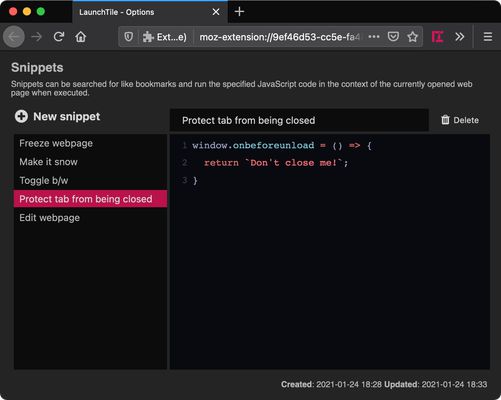
* Additionally, larger JavaScript snippets can be managed on the options page
* Initially, without search query, the most recently created bookmarks are shown
* Dark and light theme, automatically toggled by system preferences
To change the hotkey, open about:addons, click the cogwheel symbol, choose "Manage Extension Shortcuts" and look for LaunchTile.
* Results can be navigated using the keyboard (arrow keys + enter)
* Bookmarklets are detected as such and run in the context of the currently open tab
* Additionally, larger JavaScript snippets can be managed on the options page
* Initially, without search query, the most recently created bookmarks are shown
* Dark and light theme, automatically toggled by system preferences
To change the hotkey, open about:addons, click the cogwheel symbol, choose "Manage Extension Shortcuts" and look for LaunchTile.
מדורג 5 על־ידי סוקר אחד
הרשאות ונתונים
מידע נוסף
- גרסה
- 3.2.0
- גודל
- 856.98 ק״ב
- עדכון אחרון
- לפני 3 שנים (12 פבר׳ 2023)
- רישיון
- כל הזכויות שמורות
- היסטוריית הגרסאות
- הוספה לאוסף