Firefox Browser Add-ons
Extensions
Themes
More…
for Firefox
Dictionaries & Language Packs
Other Browser Sites
Add-ons for Android
Log in
Search
Search
Image Video Block
by
Tibor Barsi
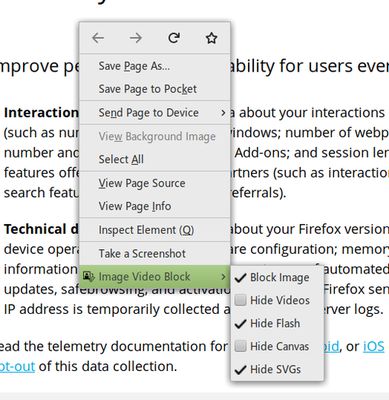
Blocks or Hides visual elements (Images, Video, Flash, Canvas, SVG).
4.1 (105 reviews)
4.1 (105 reviews)
992 Users
992 Users
Download Firefox and get the extension
Download file
Extension Metadata
Screenshots
About this extension
A Browser add-on that
Blocks or Hides
visual elements (
Images, Video, Flash, Canvas, SVG
).
Features:
Block Images (blocks downloading)
Block Media (
blocks
HTML5
video
and
audio
)
Hide Videos (hides HTML5 videos)
Hide Flash (Flash videos, games, etc.)
Hide Canvas (HTML5 games, maps, pdf, etc.)
Hide SVG (icons, charts, player buttons, etc.)
Default Keyboard Shortcuts:
Ctrl+Shift+1 Toggle the image block option
Ctrl+Shift+2 Toggle the media block option
Ctrl+Shift+3 Toggle the video hide option
Ctrl+Shift+4 Toggle the flash hide option
Ctrl+Shift+5 Toggle the svg hide option
Ctrl+Shift+6 Toggle the canvas hide option
Note: On macOS use Command+Shift+1 to 6
Rated 4.1 by 105 reviewers
Log in to rate this extension
There are no ratings yet
Star rating saved
5
63
4
16
3
8
2
7
1
11
Permissions and data
Required permissions:
Access browser tabs
Access your data for all websites
More information
Add-on Links
Homepage
Version
3.5resigned1
Size
25.15 KB
Last updated
2 years ago (Apr 25, 2024)
Related Categories
Appearance
Photos, Music & Videos
License
MIT License
Version History
See all versions
Add to collection
Select a collection…
Create new collection
Report this add-on