Dodanki za Firefox Browser
  • Rozšyrjenja
  • Drastwy
    • za Firefox
    • Słowniki a rěcne pakśiki
    • Druge sedła wobglědowaka
    • Dodanki za Android
Pśizjawiś
Pśeglěd za Save to PDF now - with no preview

Save to PDF now - with no preview wót jscher2000

Firefox can Print to PDF but some users want to speed it up by skipping the preview. Now you can call Firefox's built-in Save to PDF feature using a toolbar button, keyboard shortcut, or the right-click context menu.

3.5 (pógódnośenja: 6)3.5 (pógódnośenja: 6)
161 wužywarjow161 wužywarjow
Firefox ześěgnuś a rozšyrjenje wobstaraś
Dataju ześěgnuś

Metadaty rozšyrjenja

Fota wobrazowki
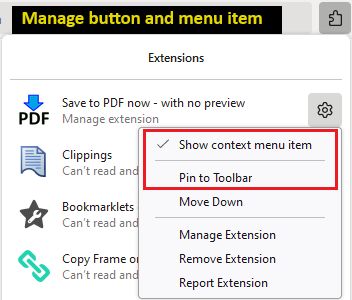
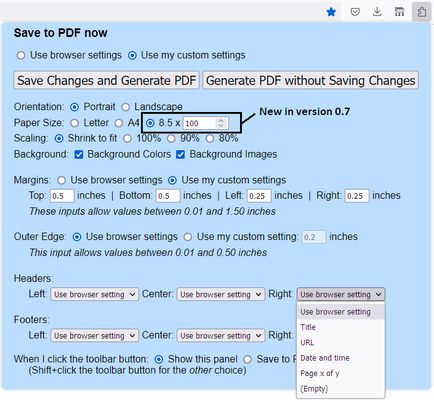
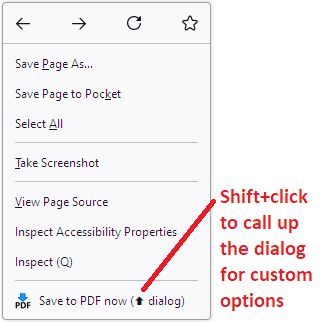
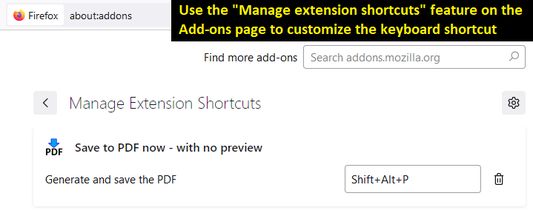
Use the toolbar button to print and also to manage custom settings. (Find the add-on button on the Extensions button drop-down.)Don't need a toolbar button? Use the right-click context menu on a blank area of the page.Don't want the context menu item? Use the toolbar button's right-click context menu to hide it.Customize your keyboard shortcut on the Add-ons page.
Wó toś tom rozšyrjenju
Three ways to print

Best for pages that you know will print correctly from past experience, since there's no preview.

Toolbar button

Click the button to open the setup panel. Print without customizing, or set your own margins, headers/footers, etc. Note: for quicker access, pin the button to the main part of the toolbar using the steps in Manage your extensions using the extensions button in the toolbar.

Or Shift+click the button to immediately generate the PDF. If you prefer to make a regular click do this, look for the "When I click the toolbar button" setting on the setup panel, and use Save Changes and Generate PDF to save it.

Right-click context menu

Regular click the "Save to PDF now" menu item to immediately generate the PDF. Shift+click it to drop the setup panel and customize your margins, header/footers, etc. (Note: drop-down doesn't appear in popup windows that do not have a regular toolbar.)

If you want to reduce menu clutter, you can remove this item. Right-click the toolbar button and uncheck "Show context menu item."

Keyboard shortcut

By default, Shift+Alt+P will immediately generate the PDF. Since this is a bit awkward, you can customize the keyboard shortcut using the steps in this support article: Manage extension shortcuts in Firefox.
Z 3,5 wót 6 pógódnośujucych pógódnośony
Pśizjawśo se, aby toś to rozšyrjenje pógódnośił
Hyšći pógódnośenja njejsu

Gwězdowe pógódnośenje jo se składło

5
2
4
2
3
0
2
1
1
1
6 pógódnośenjow cytaś
Dalšne informacije
Dodankowe wótzkaze
  • Startowy bok
  • Sedło pomocy
  • E-mailowa adresa pomocy
Wersija
0.9
Wjelikosć
23,91 KB
Slědny raz zaktualizěrowany
pred 2 rokmi (19. mar 2024)
Pśiswójźbne kategorije
  • Druge
Licenca
Licenca Mozilla Public License 2.0
Wersijowa historija
  • Wšykne wersije pokazaś
Zběrce pśidaś
Toś ten dodank k wěsći daś
K startowemu bokoju Mozilla

Dodanki

  • Wó nas
  • Blog dodankow Firefox
  • Źěłowa kupka rozšyrjenjow
  • Wuwijaŕski rožk
  • Wuwijaŕske pšawidła
  • Blog zgromaźeństwa
  • Forum
  • Programowu zmólku k wěsći daś
  • Směrnica za pógódnośenja

Wobglědowaki

  • Desktop
  • Mobile
  • Enterprise

Produkty

  • Browsers
  • VPN
  • Relay
  • Monitor
  • Pocket
  • Bluesky (@firefox.com)
  • Instagram (Firefox)
  • YouTube (firefoxchannel)
  • Priwatnosć
  • Cookieje
  • Pšawniske

Jolic nic hynac zapisane, se wopśimjeśe na toś tom sedle pód Creative Commons Attribution Share-Alike License v3.0 abo póznjejšeju wersiju licencěrujo.