Doplňky do prohlížeče Firefox
  • Rozšíření
  • Motivy vzhledu
    • pro Firefox
    • Slovníky a jazykové balíčky
    • Ostatní stránky prohlížeče
    • Doplňky pro Android
Přihlásit se
Náhled REtoUN

REtoUN od DBSH

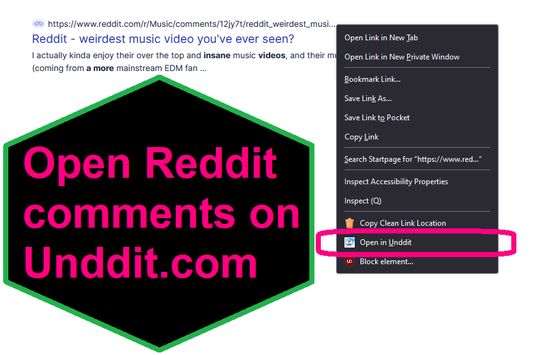
EXTENSION IS DEPRECATED - SEE ABOUT THIS EXTENSION BELOW FOR MORE DETAIL A simple extension that adds an option to the context menu to open links to Reddit comments on unddit.com instead, in a new tab.

0 (0 recenzí)0 (0 recenzí)
2 uživatelé2 uživatelé
Stáhnout Firefox a nainstalovat toto rozšíření
Stáhnout soubor

Metadata rozšíření

Snímky obrazovky
O tomto rozšíření
EXTENSION IS DEPRECATED. NOTES: https://www.unddit.com is gone, and its existence was necessary for this extension to function. I am leaving this extension published for educational purposes (someone may want to use the source for a similar use case where an option in the context menu links to a re-written URL)

This is for those who prefer to read Reddit comments on https://www.unddit.com - maybe you prefer to see deleted comments, or maybe you think "continue this thread" is a crime against UI.
To use, right-click on a link to a Reddit post, and choose Open in Unddit from the context menu. If the link to the Reddit post is https://www.reddit.com/r/news/comments/130kndv for example, using REtoUN will open https://www.unddit.com/r/news/comments/130kndv instead, in a new tab.
Komentář vývojáře
Note that in Firefox, content on https://www.unddit.com requires turning off Enhanced Tracking Protection to load. This behavior is not at all related to this extension.

Developer is not affiliated with Unddit.com, but is a huge fan of the project.

To view this extension's source code:
1. In a Firefox instance that already has this extension installed, type about:profiles in the Firefox address bar, then press Enter
2. Under the profile labeled This is the profile in use and it cannot be deleted, click on the Open Directory button (appears as Open Folder on Windows) next to Root Directory
3. In the file explorer window that opens, go into the extensions directory (the extensions folder)
4. Copy the file {d40ec1bd-9875-4dbd-a1f7-cba6e2d9d281}.xpi and paste it somewhere else, such as your Desktop
5. Rename the file you just pasted, changing the extension to .zip - so {d40ec1bd-9875-4dbd-a1f7-cba6e2d9d281}.xpi becomes {d40ec1bd-9875-4dbd-a1f7-cba6e2d9d281}.zip
6. Unzip the file {d40ec1bd-9875-4dbd-a1f7-cba6e2d9d281}.zip. The extracted files are the source, especially the .json and .js files.
Ohodnoceno 0 1 redaktorem
Pro hodnocení tohoto rozšíření se přihlaste
Zatím nehodnoceno

Hodnocení bylo uloženo

5
0
4
0
3
0
2
0
1
0
Zatím žádné recenze
Oprávnění a data

Požadovaná oprávnění:

  • Přistupovat k panelům prohlížeče
Zjistit více
Další informace
Verze
1.0
Velikost
26,31 KB
Poslední aktualizace
před 3 lety (27. dub 2023)
Příbuzné kategorie
  • RSS a blogování
  • Soukromí a bezpečnost
  • Sdílení a sociální sítě
Licence
Pouze GNU General Public License v3.0
Zásady ochrany osobních údajů
Přečtěte si zásady ochrany osobních údajů pro tento doplněk
Historie změn
  • Zobrazit všechny verze
Přidat do sbírky
Nahlásit tento doplněk
Přejít na domovskou stránku Mozilly

Počet doplňků

  • O nás
  • Blog doplňků pro Firefox
  • Workshop tvorby rozšíření
  • Pro vývojáře
  • Pravidla pro vývojáře
  • Blog komunity
  • Fórum
  • Nahlásit chybu
  • Příručka recenzenta

Prohlížeče

  • Desktop
  • Mobile
  • Enterprise

Produkty

  • Browsers
  • VPN
  • Relay
  • Monitor
  • Pocket
  • Bluesky (@firefox.com)
  • Instagram (Firefox)
  • YouTube (firefoxchannel)
  • Ochrana soukromí
  • Cookies
  • Právní informace

Není-li uvedeno jinak, obsah této stránky je šířen pod licencí Creative Commons Uveďte původ-Zachovejte licenci 3.0 nebo jakoukoli novější verzí.