
Convert Case od Convert Case Ltd
Convert text in your browser between UPPER CASE, lower case and more.
778 uživatelů778 uživatelů
Metadata rozšíření
Snímky obrazovky
O tomto rozšíření
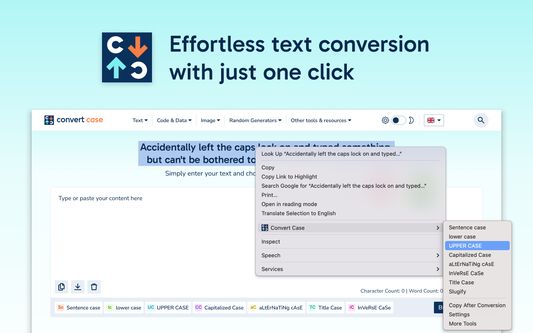
Tired of retyping text just to change the case? Select text anywhere in your browser, right-click, and convert it instantly — no copy-pasting to external tools.
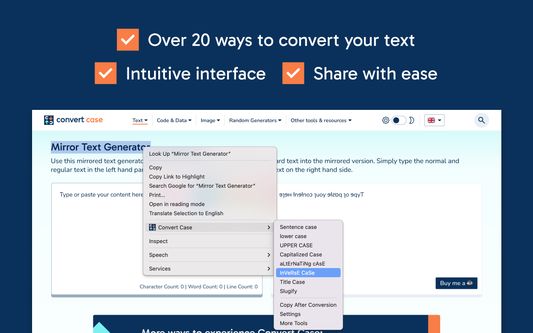
Convert Case is a fast, lightweight text case changer with 16 conversions, keyboard shortcuts, and automatic clipboard copy. Change case directly in your browser — select, right-click, done. Works on regular web pages, Google Docs, Reddit, and more.
Writing conversions
UPPER CASE, lower case, Title Case, Sentence case, Capitalized Case, No Accents
Developer conversions
camelCase, PascalCase, snake_case, CONSTANT_CASE, param-case (slugify), dot.case, path/case
Utility conversions
Alternating Case, Inverse Case, No Case (plain lowercase words)
Features
- Change case in place via right-click context menu
- Keyboard shortcuts for quick access (Alt+U, Alt+L, Alt+C, Alt+A) — or set your own
- Copy After Conversion — automatically copies converted text to the clipboard
- Ignored words list for words that should never be transformed during any conversion
- Correct words list for names, brands, and acronyms that should always be cased a specific way
- Configurable Title Case options (ignore words like "the", "and", "of")
Works with
Google Docs (Shift+right-click or keyboard shortcut), Reddit, Disqus, WYSIWYG editors, TinyMCE, and iframe-based content.
Privacy
All conversions are performed locally on your device. Convert Case does not collect, transmit, or store any user data.
Changelog
- 2.0.0 - New developer conversions (camelCase, PascalCase, CONSTANT_CASE, param-case, snake_case, dot.case, path/case), new utility conversions (Capitalized Case, Alternating Case, Inverse Case, No Accents, No Case), ignored words and correct words settings, autosave
- 1.6.0 - Support for Google Docs
- 1.5.2 - Fixed conversions not working on existing tabs after first install
- 1.5.1 - Added keyboard shortcuts link to context menu
- 1.5.0 - Additional keyboard shortcuts and refreshed info/settings UI
- 1.4.1 - Reliability updates
- 1.4.0 - Bug fixes and optimisation
- 1.3.0 - New icon
- 1.2.1 - Disqus and Slate Editor fixes
- 1.2.0 - Support for Disqus and more iframe-based content
- 1.1.0 - Support for Reddit and WYSIWYG editors
- 1.0.10 - Fixed automatic copy after conversion not working
- 1.0.9 - Settings page for title case options and keyboard shortcuts
- 1.0.8 - Reliability updates
- 1.0.7 - Title Case conversion and Slugify option
- 1.0.0 - Initial release
Convert Case is a fast, lightweight text case changer with 16 conversions, keyboard shortcuts, and automatic clipboard copy. Change case directly in your browser — select, right-click, done. Works on regular web pages, Google Docs, Reddit, and more.
Writing conversions
UPPER CASE, lower case, Title Case, Sentence case, Capitalized Case, No Accents
Developer conversions
camelCase, PascalCase, snake_case, CONSTANT_CASE, param-case (slugify), dot.case, path/case
Utility conversions
Alternating Case, Inverse Case, No Case (plain lowercase words)
Features
- Change case in place via right-click context menu
- Keyboard shortcuts for quick access (Alt+U, Alt+L, Alt+C, Alt+A) — or set your own
- Copy After Conversion — automatically copies converted text to the clipboard
- Ignored words list for words that should never be transformed during any conversion
- Correct words list for names, brands, and acronyms that should always be cased a specific way
- Configurable Title Case options (ignore words like "the", "and", "of")
Works with
Google Docs (Shift+right-click or keyboard shortcut), Reddit, Disqus, WYSIWYG editors, TinyMCE, and iframe-based content.
Privacy
All conversions are performed locally on your device. Convert Case does not collect, transmit, or store any user data.
Changelog
- 2.0.0 - New developer conversions (camelCase, PascalCase, CONSTANT_CASE, param-case, snake_case, dot.case, path/case), new utility conversions (Capitalized Case, Alternating Case, Inverse Case, No Accents, No Case), ignored words and correct words settings, autosave
- 1.6.0 - Support for Google Docs
- 1.5.2 - Fixed conversions not working on existing tabs after first install
- 1.5.1 - Added keyboard shortcuts link to context menu
- 1.5.0 - Additional keyboard shortcuts and refreshed info/settings UI
- 1.4.1 - Reliability updates
- 1.4.0 - Bug fixes and optimisation
- 1.3.0 - New icon
- 1.2.1 - Disqus and Slate Editor fixes
- 1.2.0 - Support for Disqus and more iframe-based content
- 1.1.0 - Support for Reddit and WYSIWYG editors
- 1.0.10 - Fixed automatic copy after conversion not working
- 1.0.9 - Settings page for title case options and keyboard shortcuts
- 1.0.8 - Reliability updates
- 1.0.7 - Title Case conversion and Slugify option
- 1.0.0 - Initial release
Hodnocení: 4,6 od 15 redaktorů
Oprávnění a data
Požadovaná oprávnění:
- Přistupovat k panelům prohlížeče
- Přistupovat k vašim datům pro všechny webové stránky
Další informace
- Odkazy doplňku
- Verze
- 2.0.0
- Velikost
- 43,03 KB
- Poslední aktualizace
- před 4 dny (6. dub 2026)
- Příbuzné kategorie
- Licence
- Všechna práva vyhrazena
- Historie změn
- Přidat do sbírky
Vývojář tohoto doplňku váš žádá o malý příspěvek, kterým pomůžete podpořit vývoj do budoucna.