
W3Techs Website Technology Information 作者: SamSol
Shows which web technologies the current site is using.
500 位使用者500 位使用者
擴充套件後設資料
畫面擷圖
關於此擴充套件
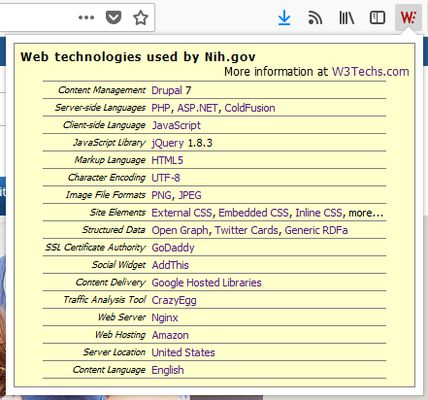
The W3Techs extension shows with one mouse click which web technologies the current site is using.
The technologies shown include content management systems, server-side and client-side programming languages, JavaScript libraries, markup languages, character encodings, structured data formats, SSL certificate authorities, web servers, operating systems, traffic analysis tools, advertising networks, tag managers, hosting providers, content delivery networks, server locations and more.
Disclaimer: When you click on the add-on's icon, the hostname of the current tab is sent to w3techs.com in order to retrieve the web technology information.
The technologies shown include content management systems, server-side and client-side programming languages, JavaScript libraries, markup languages, character encodings, structured data formats, SSL certificate authorities, web servers, operating systems, traffic analysis tools, advertising networks, tag managers, hosting providers, content delivery networks, server locations and more.
Disclaimer: When you click on the add-on's icon, the hostname of the current tab is sent to w3techs.com in order to retrieve the web technology information.
To put the extensions button on your toolbar, right-click on the toolbar, select "Customize...", look for the W3Techs icon and drag it to a convenient location on your toolbar.
由 1 位評論者給出 4.2 分
權限與資料
更多資訊
- 版本
- 2.7
- 大小
- 26.44 KB
- 最近更新
- 4 年前 (2021年11月18日)
- 隱私權保護政策
- 閱讀此附加元件的隱私權保護政策
- 版本紀錄
- 新增至收藏集