Firefox 瀏覽器附加元件
擴充套件
佈景主題
更多…
用於 Firefox
字典與語言套件
其他瀏覽器網站
Android 版的附加元件
登入
搜尋
搜尋
Quick Clone
作者:
Kartikay Bagla
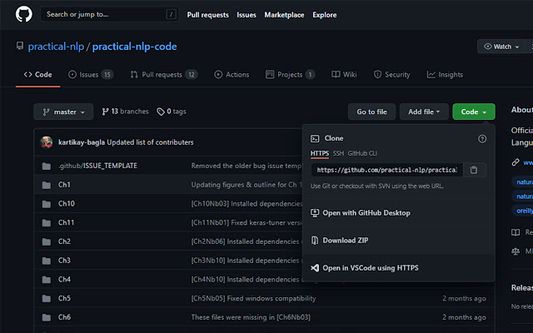
Quick Clone can open GitHub repositories in VS Code with one click.
實驗中
實驗中
0(0 筆評分)
0(0 筆評分)
27 位使用者
27 位使用者
下載 Firefox 並安裝擴充套件
下載檔案
擴充套件後設資料
畫面擷圖
關於此擴充套件
How to use
Install the
VS Code extension
Install the corresponding browser extension
Navigate to a GitHub repository in your browser
Click on the green Code button and select "Open in VSCode"
Once VS Code opens, select the folder where the repository will be cloned
Once the cloning is complete, you can choose to open the cloned folder
由 1 位評論者給出 0 分
登入後即可幫此擴充套件評分
目前沒有評分
已儲存星等
5
0
4
0
3
0
2
0
1
0
權限與資料
必要權限:
存取您在 github.com 的資料
更多資訊
附加元件網址
首頁
技術支援網站
技術支援信箱
版本
1.0.1
大小
15.79 KB
最近更新
5 年前 (2021年8月21日)
相關分類
其它
授權條款
僅 GNU General Public License v3.0
版本紀錄
瀏覽所有版本
新增至收藏集
選擇收藏集…
建立新收藏集
檢舉此附加元件