
PrsPrsCopy 作者: PrsPrsBK
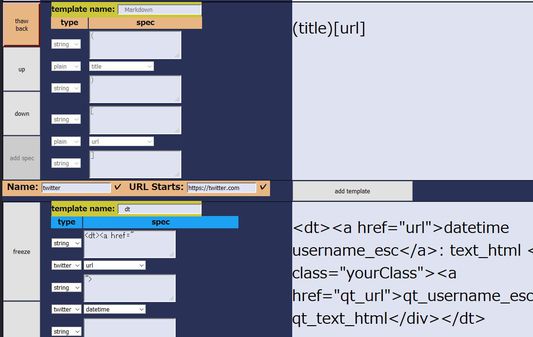
Princess Princess Copy. Copy Utility only for text. When no range selected on page, Alt-c copy with template composedof url, title, or so. Also, we can copy from Toolbar icon. We can edit templates in options page.
無使用者無使用者
擴充套件後設資料
畫面擷圖

關於此擴充套件
For each 'Alt-c' key, copy text to clipboard. Text is constructed with one of the templates for URL-matched website.
And after Alt-c key, choice of template is shift to next. Next Alt-c means 'copying with other template and shift'.
Toolbar icon tell 'copy is fired' and 'next index of template'.
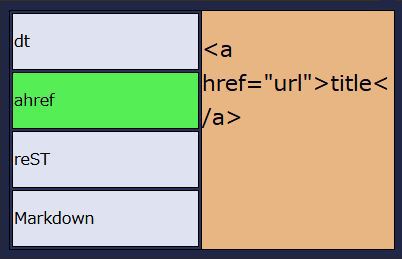
Also, clicking toolbar icon shows the list of template, and clicking template-name button go 'start copying'.
Q & A
* Plan to implement CSS Selector?
No. In short, I don't empower any evil or not-fun or far from interesting behaviors descrived below.
To be honest, I want to use it by myself, because it's very powerful and convenient.
But if implemented, there will be some bad behavior, involving e.g. 'foo: nth-child(100000)'.
It may result in something-overflow, and lead to the slowdown or crush of addon process, or browser.
And if so, does it lead to execution of malware?
I don't know what will happen and would like to prevent such things.
And simply, I don't help kids-like net watchers to collect SNS user-id or so.
* Preview within the popup menu?
Under considering. It maybe nice.
* Plan to 'Add to the end of clipboard'?
Under considering. I maybe want to use it, when copying from the same twitter time line.
But it does not happen so many times that I decide to 'implement right now anyway'.
Candidate key is Shift-Alt-c.
* Why Alt-c? Not Ctrl-c?
If it uses Ctrl-c, it will be obstacle for user who want to copy from location bar.
Addon can not know whether the focus is within location bar or not.
So when user try to copy from location bar, addon always works, and would send templated-copy to clipboard.
So I choiced another, resemble one.
* How to handle indent level?
Within each templete, we can add the indent to the head of string.
But generally, having other tools to adjust indent is better.
Other tools means text editor, formatter or so.
Maybe it's not fun to elaborate on this addon's settings.
Let's combine with and delegate to tools.
* Why not Google Chrome?
2019-02-26 Update: published.
https://chrome.google.com/webstore/detail/prsprscopy/hghdhiodkbbogfnbhknleobjjpadlmcc
And after Alt-c key, choice of template is shift to next. Next Alt-c means 'copying with other template and shift'.
Toolbar icon tell 'copy is fired' and 'next index of template'.
Also, clicking toolbar icon shows the list of template, and clicking template-name button go 'start copying'.
Q & A
* Plan to implement CSS Selector?
No. In short, I don't empower any evil or not-fun or far from interesting behaviors descrived below.
To be honest, I want to use it by myself, because it's very powerful and convenient.
But if implemented, there will be some bad behavior, involving e.g. 'foo: nth-child(100000)'.
It may result in something-overflow, and lead to the slowdown or crush of addon process, or browser.
And if so, does it lead to execution of malware?
I don't know what will happen and would like to prevent such things.
And simply, I don't help kids-like net watchers to collect SNS user-id or so.
* Preview within the popup menu?
Under considering. It maybe nice.
* Plan to 'Add to the end of clipboard'?
Under considering. I maybe want to use it, when copying from the same twitter time line.
But it does not happen so many times that I decide to 'implement right now anyway'.
Candidate key is Shift-Alt-c.
* Why Alt-c? Not Ctrl-c?
If it uses Ctrl-c, it will be obstacle for user who want to copy from location bar.
Addon can not know whether the focus is within location bar or not.
So when user try to copy from location bar, addon always works, and would send templated-copy to clipboard.
So I choiced another, resemble one.
* How to handle indent level?
Within each templete, we can add the indent to the head of string.
But generally, having other tools to adjust indent is better.
Other tools means text editor, formatter or so.
Maybe it's not fun to elaborate on this addon's settings.
Let's combine with and delegate to tools.
* Why not Google Chrome?
2019-02-26 Update: published.
https://chrome.google.com/webstore/detail/prsprscopy/hghdhiodkbbogfnbhknleobjjpadlmcc
由 1 位評論者給出 0 分
權限與資料
更多資訊
- 附加元件網址
- 版本
- 0.10.3
- 大小
- 27.14 KB
- 最近更新
- 6 年前 (2019年10月7日)
- 相關分類
- 授權條款
- MIT License
- 版本紀錄
- 新增至收藏集