
Docify – Export Your AI Chats 作者: Abdiwaahid
The easiest way to save, export, and format your AI chat conversations.
88 位使用者88 位使用者
擴充套件後設資料
畫面擷圖


關於此擴充套件
Docify – Export Your AI Chats
🌟 Never lose your AI chats again! Docify is your go-to tool for effortlessly saving, organizing, and reusing conversations from AI platforms like ChatGPT, Claude, Grok, and more. Transform your chats into professional documents with ease.
Why Docify?
Say goodbye to manual copy-pasting! Whether you’re a student 📚, writer ✍️, developer 💻, or just love keeping records, Docify makes archiving your AI interactions simple, fast, and secure.
⚡ What Docify Does:
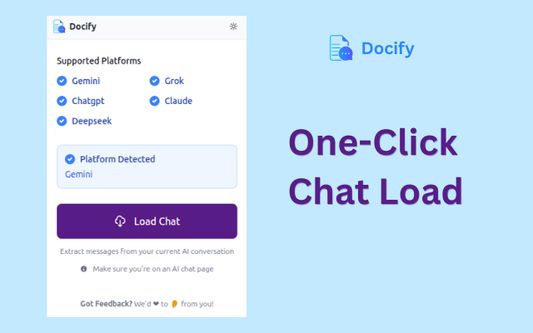
With just one click, Docify scans your open AI chat and gets it ready for export — no copy-pasting required. Whether you’re saving research, drafting ideas, or backing up important conversations, Docify makes it effortless.
✨ Key Features:
🖱️ One-Click Chat Load
Reads and loads your active AI chat instantly from supported platforms.
📝 Flexible Export Options
Save chats in multiple formats:
📄 Microsoft Word (.docx)
📑 Markdown (.md)
📋 Plain Text (copy to clipboard)
🖨️ Printable view
🧠 Content Selection
Export exactly what you need:
👤 User messages only
🤖 AI responses only
🧾 The full conversation
🛠️ Personalized Output
✍️ Add a custom document name
🕒 Include or skip timestamps in filenames
✂️ Edit or remove content directly in the preview
🔒 Privacy-First Design
All data stays local on your device. Nothing is ever sent to external servers.
🤖 Broad Platform Support
Works seamlessly with ChatGPT, Claude, Grok, Gemini, DeepSeek, and AI Studio.
🧠 Who It’s For:
🎓 Students saving research or notes
✍️ Writers drafting content from AI
👨💻 Developers logging useful code snippets
💡 Everyone who wants to capture great AI ideas
🚀 Install Docify Now
Never let a great AI chat slip away. Export your conversations effortlessly and professionally with Docify!
🌟 Never lose your AI chats again! Docify is your go-to tool for effortlessly saving, organizing, and reusing conversations from AI platforms like ChatGPT, Claude, Grok, and more. Transform your chats into professional documents with ease.
Why Docify?
Say goodbye to manual copy-pasting! Whether you’re a student 📚, writer ✍️, developer 💻, or just love keeping records, Docify makes archiving your AI interactions simple, fast, and secure.
⚡ What Docify Does:
With just one click, Docify scans your open AI chat and gets it ready for export — no copy-pasting required. Whether you’re saving research, drafting ideas, or backing up important conversations, Docify makes it effortless.
✨ Key Features:
🖱️ One-Click Chat Load
Reads and loads your active AI chat instantly from supported platforms.
📝 Flexible Export Options
Save chats in multiple formats:
📄 Microsoft Word (.docx)
📑 Markdown (.md)
📋 Plain Text (copy to clipboard)
🖨️ Printable view
🧠 Content Selection
Export exactly what you need:
👤 User messages only
🤖 AI responses only
🧾 The full conversation
🛠️ Personalized Output
✍️ Add a custom document name
🕒 Include or skip timestamps in filenames
✂️ Edit or remove content directly in the preview
🔒 Privacy-First Design
All data stays local on your device. Nothing is ever sent to external servers.
🤖 Broad Platform Support
Works seamlessly with ChatGPT, Claude, Grok, Gemini, DeepSeek, and AI Studio.
🧠 Who It’s For:
🎓 Students saving research or notes
✍️ Writers drafting content from AI
👨💻 Developers logging useful code snippets
💡 Everyone who wants to capture great AI ideas
🚀 Install Docify Now
Never let a great AI chat slip away. Export your conversations effortlessly and professionally with Docify!
由 1 位評論者給出 5 分
權限與資料
必要權限:
- 存取您在 aistudio.google.com 的資料
- 存取您在 chat.deepseek.com 的資料
- 存取您在 chatgpt.com 的資料
- 存取您在 claude.ai 的資料
- 存取您在 gemini.google.com 的資料
- 存取您在 grok.com 的資料
更多資訊
- 附加元件網址
- 版本
- 1.6
- 大小
- 150.07 KB
- 最近更新
- 2 個月前 (2025年10月17日)
- 相關分類
- 授權條款
- 保留所有權利
- 隱私權保護政策
- 閱讀此附加元件的隱私權保護政策
- 版本紀錄
- 新增至收藏集