Firefox 浏览器附加组件
扩展
主题
更多…
适用于 Firefox
字典和语言包
其他浏览器网站
适用于 Android 的附加组件
登录
搜索
搜索
Quick Clone
作者:
Kartikay Bagla
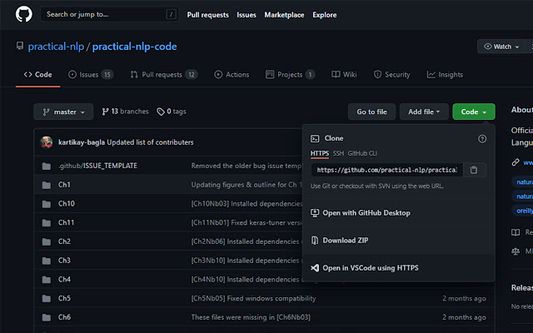
Quick Clone can open GitHub repositories in VS Code with one click.
实验性
实验性
0(0 条评价)
0(0 条评价)
26 个用户
26 个用户
下载 Firefox 并安装扩展
下载文件
扩展元数据
屏幕截图
关于此扩展
How to use
Install the
VS Code extension
Install the corresponding browser extension
Navigate to a GitHub repository in your browser
Click on the green Code button and select "Open in VSCode"
Once VS Code opens, select the folder where the repository will be cloned
Once the cloning is complete, you can choose to open the cloned folder
评分 0(1 位用户)
登录以评价此扩展
目前尚无评分
已保存星级评分
5
0
4
0
3
0
2
0
1
0
权限与数据
必要权限:
访问您在 github.com 的数据
更多信息
附加组件链接
主页
用户支持网站
支持邮箱
版本
1.0.1
大小
15.79 KB
上次更新
5 年前 (2021年8月21日)
相关分类
其他
许可证
仅 GNU 通用公共许可证 v3.0
版本历史
查看所有版本
添加到收藏集
选择一个收藏集…
创建新收藏集
举报此附加组件