Додатки браузера Firefox
  • Розширення
  • Теми
    • для Firefox
    • Словники та локалізації
    • Інші сайти браузера
    • Додатки для Android
Увійти
Перегляд REtoUN

REtoUN автор DBSH

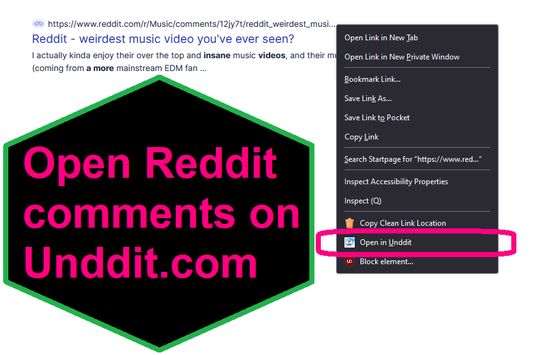
EXTENSION IS DEPRECATED - SEE ABOUT THIS EXTENSION BELOW FOR MORE DETAIL A simple extension that adds an option to the context menu to open links to Reddit comments on unddit.com instead, in a new tab.

0 (0 reviews)0 (0 reviews)
2 Users2 Users
Завантажити Firefox та отримати розширення
Завантажити файл

Метадані розширення

Знімки екрана
Про це розширення
EXTENSION IS DEPRECATED. NOTES: https://www.unddit.com is gone, and its existence was necessary for this extension to function. I am leaving this extension published for educational purposes (someone may want to use the source for a similar use case where an option in the context menu links to a re-written URL)

This is for those who prefer to read Reddit comments on https://www.unddit.com - maybe you prefer to see deleted comments, or maybe you think "continue this thread" is a crime against UI.
To use, right-click on a link to a Reddit post, and choose Open in Unddit from the context menu. If the link to the Reddit post is https://www.reddit.com/r/news/comments/130kndv for example, using REtoUN will open https://www.unddit.com/r/news/comments/130kndv instead, in a new tab.
Коментарі розробника
Note that in Firefox, content on https://www.unddit.com requires turning off Enhanced Tracking Protection to load. This behavior is not at all related to this extension.

Developer is not affiliated with Unddit.com, but is a huge fan of the project.

To view this extension's source code:
1. In a Firefox instance that already has this extension installed, type about:profiles in the Firefox address bar, then press Enter
2. Under the profile labeled This is the profile in use and it cannot be deleted, click on the Open Directory button (appears as Open Folder on Windows) next to Root Directory
3. In the file explorer window that opens, go into the extensions directory (the extensions folder)
4. Copy the file {d40ec1bd-9875-4dbd-a1f7-cba6e2d9d281}.xpi and paste it somewhere else, such as your Desktop
5. Rename the file you just pasted, changing the extension to .zip - so {d40ec1bd-9875-4dbd-a1f7-cba6e2d9d281}.xpi becomes {d40ec1bd-9875-4dbd-a1f7-cba6e2d9d281}.zip
6. Unzip the file {d40ec1bd-9875-4dbd-a1f7-cba6e2d9d281}.zip. The extracted files are the source, especially the .json and .js files.
Rated 0 by 0 reviewers
Увійдіть, щоб оцінити це розширення
Ще немає оцінок

Рейтинг збережено

5
0
4
0
3
0
2
0
1
0
Ще немає відгуків
Permissions and data

Необхідні дозволи:

  • Отримувати доступ до вкладок браузера
Докладніше
Більше інформації
Версія
1.0
Розмір
26,31 КБ
Востаннє оновлено
3 роки тому (27 квіт 2023 р.)
Пов'язані категорії
  • RSS, новини та блоги
  • Приватність і безпека
  • Соціальні
Ліцензія
Лише Загальна громадська ліцензія GNU v3.0
Політика приватності
Ознайомитись з політикою приватності для цього додатка
Історія версій
  • Переглянути всі версії
Додати до збірки
Повідомити про цей додаток
Перейти на домівку Mozilla

Додатки

  • Про
  • Блог додатків Firefox
  • Семінар з розширень
  • Центр розробника
  • Політики розробників
  • Блог спільноти
  • Форум
  • Повідомити про помилку
  • Настанови з написання відгуків

Браузери

  • Desktop
  • Mobile
  • Enterprise

Продукти

  • Browsers
  • VPN
  • Relay
  • Monitor
  • Pocket
  • Bluesky (@firefox.com)
  • Instagram (Firefox)
  • YouTube (firefoxchannel)
  • Приватність
  • Файли cookie
  • Правові положення

За винятком випадків зазначених тут, вміст цього сайту ліцензовано на умовах ліцензії Creative Commons Attribution Share-Alike License v3.0, або будь-якою новішою версією.