
Export Memrise Progress автор neoncube
Export your Memrise community course's progress.
54 Users54 Users
Метадані розширення
Знімки екрана
Про це розширення
This extension lets you save your Memrise community course's progress, so that you can import it into another site, such as mylittlewordland.com or deckademy.com
To download your progress:
1. Go to https://community-courses.memrise.com
2. Open a course. You should now be on the course's overview page.
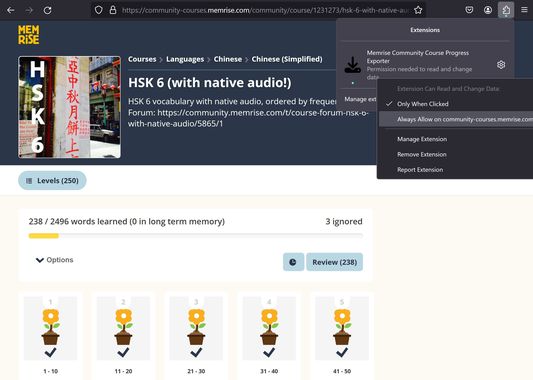
3. Click the Firefox extensions icon, right click the Memrise Community Course Progress Exporter extension, and select "Always Allow on community-courses.memrise.com" (See screenshot).
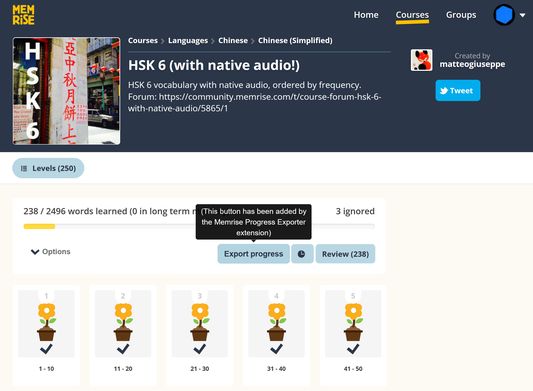
4. Click the blue "Export progress" button.
To download your progress:
1. Go to https://community-courses.memrise.com
2. Open a course. You should now be on the course's overview page.
3. Click the Firefox extensions icon, right click the Memrise Community Course Progress Exporter extension, and select "Always Allow on community-courses.memrise.com" (See screenshot).
4. Click the blue "Export progress" button.
Rated 0 by 0 reviewers
Permissions and data
Необхідні дозволи:
- Отримувати доступ до ваших даних для community-courses.memrise.com
- Отримувати доступ до ваших даних для app.memrise.com
Необов'язкові дозволи:
- Отримувати доступ до ваших даних для community-courses.memrise.com
- Отримувати доступ до ваших даних для app.memrise.com
Більше інформації
- Версія
- 1.12
- Розмір
- 24,21 КБ
- Востаннє оновлено
- 7 місяців тому (12 лип 2025 р.)
- Пов'язані категорії
- Ліцензія
- Усі права захищені
- Історія версій
- Додати до збірки