Slack App-in-Tab Reborn av Axel Leroy
Open the Slack app with its multi-workspace sidebar in a simple browser tab, freeing you from using the Slack app!
Inga användareInga användare
Metadata för tillägg
Skärmbilder
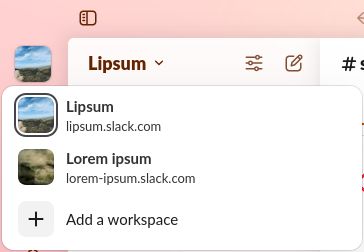
Om detta tillägg
Slack App-in-Tab Reborn is a fork of "Slack App-in-Tab" which has unfortunately stopped working. This version keeps the same functionality as the original.
How to use
How does it work?
Slack App-in-Tab Reborn changes how Firefox presents itself to Slack so it believes you are browsing from a Chromebook. Since Chromebooks can't run the Slack app, it then shows the workspace switcher as it does in the app.
How to use
- Install the extension
- Visit https://app.slack.com and log into any of your workspaces
- That's it, all your workspaces appear in the sidebar, just like in the Slack App
How does it work?
Slack App-in-Tab Reborn changes how Firefox presents itself to Slack so it believes you are browsing from a Chromebook. Since Chromebooks can't run the Slack app, it then shows the workspace switcher as it does in the app.
Access to slack.com is required in order to change the User-Agent (the way Firefox presents itself to Slack)
Betyg 0 av 0 recensenter
Behörigheter och data
Nödvändiga behörigheter:
- Åtkomst till webbläsarens flikar
- Åtkomst till dina data för platser i domänen slack.com
Datainsamling:
- Utvecklaren säger att detta tillägg inte kräver datainsamling.
Mer information
- Länkar för tillägg
- Version
- 2025.11.22
- Storlek
- 24,24 kB
- Senast uppdaterad
- för 12 dagar sedan (22 nov 2025)
- Relaterade kategorier
- Versionshistorik
- Lägg till i samling