Webbläsartillägg för Firefox
  • Tillägg
  • Teman
    • för Firefox
    • Ordlistor & språkpaket
    • Andra webbläsarplatser
    • Tillägg för Android
Logga in
Förhandsvisning av QR Issue Card Printer PRO for Jira Cloud

QR Issue Card Printer PRO for Jira Cloud av MrAddon

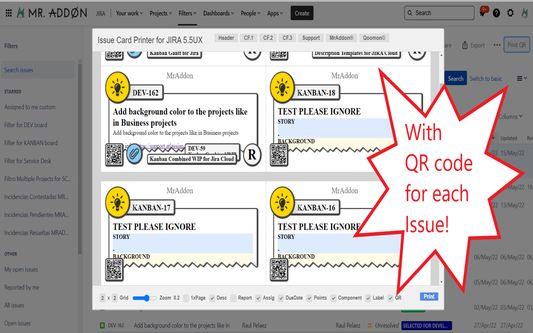
Print your filters and issues with a single click, with a configurable and beautiful layout.Show a large QR code in each card to quickly locate your tickets.Now you can also print from your Kanban or Scrum board and from your backlog view!New feature

ExperimentellExperimentell
0 (0 recensioner)0 (0 recensioner)
2 användare2 användare
Hämta Firefox och få tillägget
Hämta fil

Metadata för tillägg

Skärmbilder
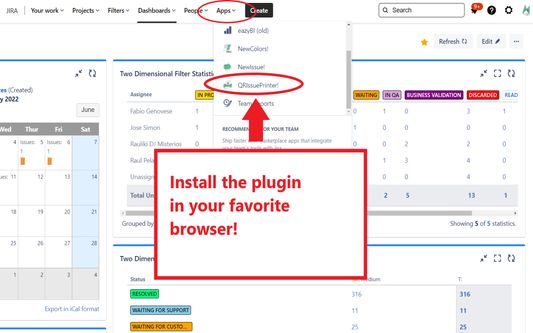
Install the add-on in your favorite browser!
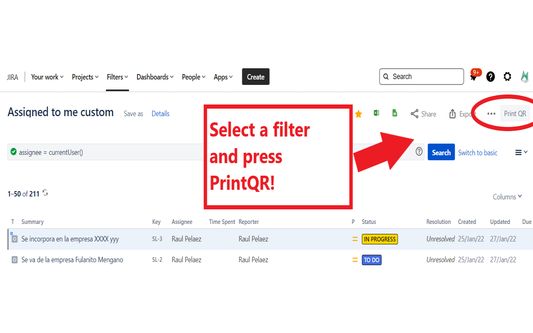
Go to Apps → QRIssuePrinter! and install the add-on in your favorite browserPush PrintQR! button in issues, filters or boards
That’s all! Now take a look in your Issues, Filters and Kanban/SCRUM boards and backlogs and you will see a new button “Print QR”Ready to print in one click!!
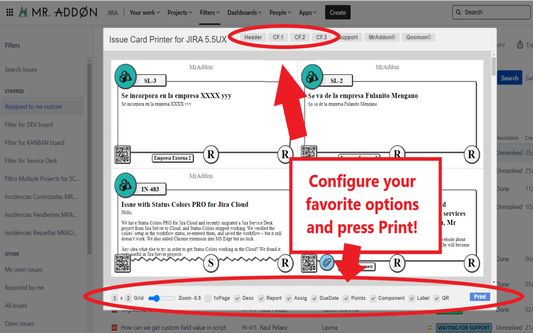
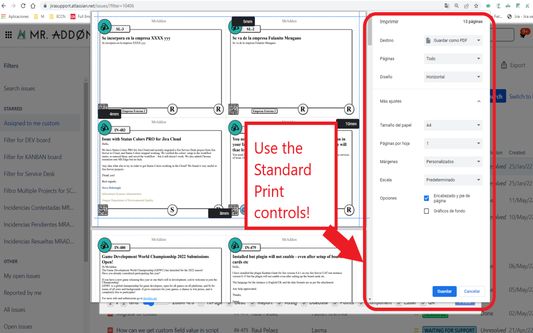
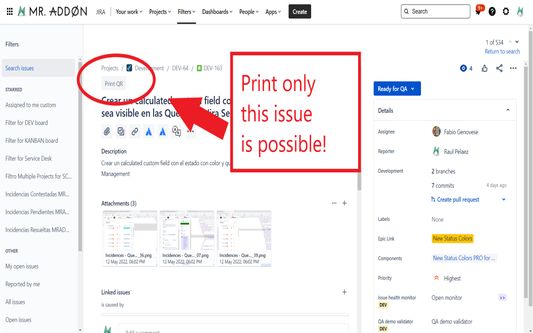
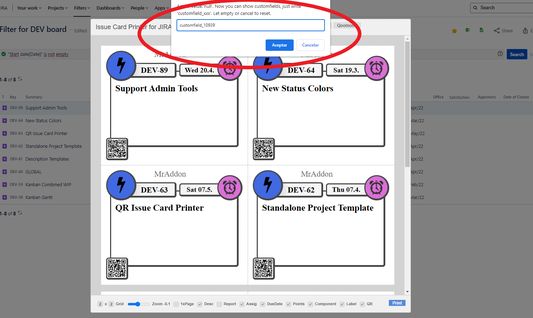
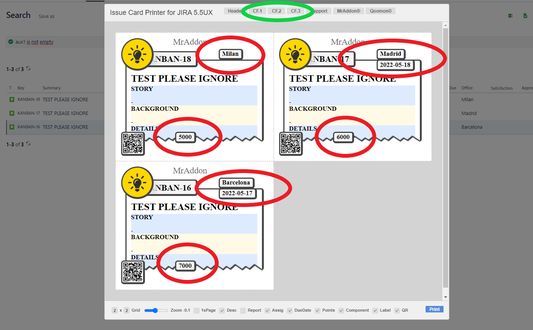
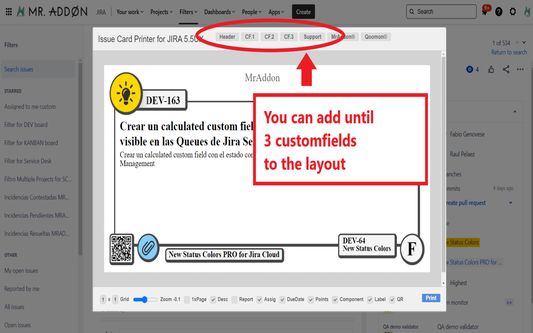
After press the “Print QR” button you will see a beatiful cards ready to print in one click!!Just configure the final part, page margins and Save it as PDF or just print in your usual printer!Now we can configure show/hide the system fields of Jira, we have a Zoom control and grid control, also of course, the QR code.If you need to print only one issue, it’s possible of course! Search the “Print QR” button and that’s all!Click in CF1 or CF2 or CF3 buttons and add the “customfield_xxxx” value where “xxxx” is the ID of the customfieldClick in CF1 or CF2 or CF3 buttons and add the “customfield_xxxx” value where “xxxx” is the ID of the customfieldClick in CF1 or CF2 or CF3 buttons and add the “customfield_xxxx” value where “xxxx” is the ID of the customfield
Om detta tillägg
Print your filters and issues with a single click, with a configurable and beautiful layout.Show a large QR code in each card to quickly locate your tickets.Now you can also print from your Kanban or Scrum board and from your backlog view!New features coming soon!

Install the add-on in your favorite browser!
Go to Apps → QRIssuePrinter! and install the add-on in your favorite browser

Push PrintQR! button in issues, filters or boards
That’s all! Now take a look in your Issues, Filters and Kanban/SCRUM boards and backlogs and you will see a new button “Print QR”

Ready to print in one click!!
After press the “Print QR” button you will see a beatiful cards ready to print in one click!!

Vide summary: https://www.youtube.com/watch?v=AVp7n4f4qUk
Betyg 0 av 0 recensenter
Logga in för att betygsätta detta tillägg
Det finns inga betyg än

Stjärnklassificering sparad

5
0
4
0
3
0
2
0
1
0
Inga recensioner ännu
Behörigheter och data

Nödvändiga behörigheter:

  • Åtkomst till dina data för platser i domänen atlassian.net
  • Åtkomst till dina data för platser i domänen jira.com

Valfria behörigheter:

  • Åtkomst till dina data för platser i domänen atlassian.net
  • Åtkomst till dina data för platser i domänen jira.com
Läs mer
Mer information
Länkar för tillägg
  • Hemsida
  • Webbplats för support
  • E-post för support
Version
7.3.0
Storlek
170,84 kB
Senast uppdaterad
för 3 dagar sedan (18 dec 2025)
Relaterade kategorier
  • Webbutveckling
Licens
Mozilla Public License 2.0
Versionshistorik
  • Se alla versioner
Lägg till i samling
Rapportera detta tillägg
Gå till Mozillas hemsida

Tillägg

  • Om
  • Firefox tilläggsblogg
  • Verkstad för tillägg
  • Utvecklarcenter
  • Utvecklarpolicyer
  • Community-blogg
  • Forum
  • Rapportera en bugg
  • Recensionsriktlinjer

Webbläsare

  • Desktop
  • Mobile
  • Enterprise

Produkter

  • Browsers
  • VPN
  • Relay
  • Monitor
  • Pocket
  • Bluesky (@firefox.com)
  • Instagram (Firefox)
  • YouTube (firefoxchannel)
  • Sekretess
  • Kakor
  • Juridisk information

Om inget annat anges, är innehållet på denna webbplats licensierat under licensen Creative Commons Attribution Share-Alike License v3.0 eller senare version.