Hide Subscribed Listing av Asjad
Hide YouTube subscribed videos by clicking on thumbnail of videos on subscription page.
Metadata för tillägg
Skärmbilder
Om detta tillägg
Hide subscribed Listing
Hide YouTube subscribed videos by clicking on thumbnail of videos on subscription page.
How to use
Hide YouTube subscribed videos by clicking on thumbnail of videos on subscription page.
How to use
- Download and Install Extension
- Go to subscription page of YouTube web app
- Wait for the page to load
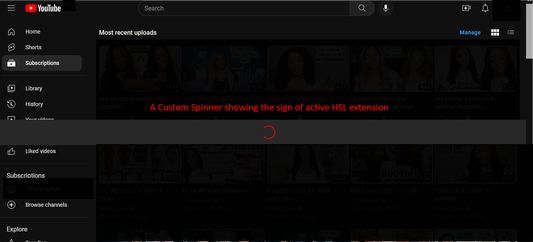
- A custom spinner will appear that will do some page modification
- Wait for the spinner to disappear
- Click on a video's thumbnail
- That video will be hidden from the subscription page
- Enjoy :)
Betyg 3 av 1 recensent
Behörigheter och data
Nödvändiga behörigheter:
- Visa meddelanden till dig
- Åtkomst till webbläsarens flikar
- Åtkomst till dina data för www.youtube.com
Mer information
- Version
- 1.32
- Storlek
- 108,76 kB
- Senast uppdaterad
- för 2 år sedan (31 jul 2023)
- Relaterade kategorier
- Licens
- Med ensamrätt
- Versionshistorik
- Lägg till i samling