YouTube toggle Flash and HTML од James Fray
Adds a toolbar button to toggle between Flash and the default HTML players
64 корисника64 корисника
Метаподаци додатка
Снимци екрана
О овом додатку
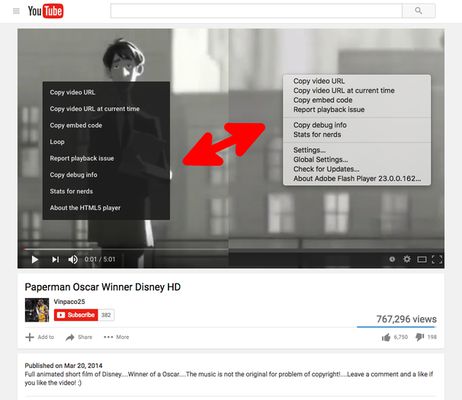
YouTube™ toggle Flash and HTML Players adds a toolbar button to your Firefox toolbar to allow you toggle between two different player types that YouTube supports.
For short videos it is recommended to use the default HTML5 player. For long videos however, Flash player usually performs better and is lighter on resources.
For FAQs and bug reports please visit:
http://add0n.com/youtube-tools.html?from=flash-toggle
--- My YouTube Enhancer Tools---
For short videos it is recommended to use the default HTML5 player. For long videos however, Flash player usually performs better and is lighter on resources.
For FAQs and bug reports please visit:
http://add0n.com/youtube-tools.html?from=flash-toggle
--- My YouTube Enhancer Tools---
- YouTube use Flash Player
- YouTube in HD (720p, 1080p, 1440p, 2160p)
- YouTube no Annotations
- YouTube no Buffer (no autoplay)
- YouTube Stop AutoPlay Next
- YouTube toggle Flash and HTML
- YouTube Player AdBlocker
- YouTube auto Pause and Resume
- YouTube™ Stop Button
- Theater Mode for YouTube (YouTube Wide Screen)
- ---
Please note that the FAQs page of this extension contains Google Analytics; Terms can be found https://www.google.com/analytics/terms/us.html
Оцењено са 4,3 од стране 10 рецензената
Овлашћења и подаци
Потребна овлашћења:
- Приступи језичцима прегледача
- Приступ вашим подацима за www.youtube.com
Више информација
- Издање
- 0.1.1resigned1
- Величина
- 94,7 KB
- Последњи пут ажурирано
- pre 2 godine (25. apr. 2024.)
- Повезане категорије
- Дозвола
- Јавна дозвола Mozilla 2.0
- Политика приватности
- Прочитајте политику приватности за овај додатак
- Историјат издања
- Додај у збирку
Програмер овог додатка вас моли да помогнете у подршци за његов даљи развој тако што ћете дати мали допринос.