
HoverTranslate - YouTube Subtitle Translator — Kozii
Learn languages on YouTube: hover over a subtitle word to see its translation, save it to your word list. Free, no account needed.
739 uporabnikov739 uporabnikov
Metapodatki o razširitvi
Posnetki zaslona


O tej razširitvi
HoverTranslate – a YouTube subtitle translator for learning languages from videos
Watching a video with Spanish or Japanese subtitles and hit a word you don't know? Just hover over it, and the translation appears right above the subtitles. The video pauses while you read and plays on as soon as you move the pointer away. No copying words into a translator, no losing the thread – you keep watching and understand more.
What HoverTranslate does:
• Translates single words and whole phrases. Found an idiom or a set expression? Hold Shift and sweep the pointer across the words. If you'd rather not hold Shift, you can switch that on in the settings.
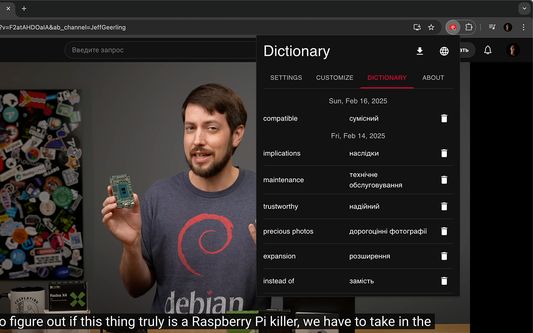
• Builds your personal word list. Click a word, and it's saved together with its translation. Export the list as CSV or JSON to review your new words later.
• Works with auto-generated subtitles too – the ones YouTube creates itself – so videos without subtitles from the creator work as well.
• Not just on YouTube itself: when a video is embedded in a blog post, an online course or a news article, just hover over a word the same way.
• Handles Chinese, Japanese and Thai: even though they're written without spaces between words, you get the translation of one word, not the whole line.
• Translates into more than 240 languages and detects the subtitle language on its own.
• Blends in: the translation looks just like your YouTube subtitles. Want something different? Pick your own font, color and size.
• Fits the way you watch: auto-pause can be turned off, and a click can copy the word or its translation instead of saving it.
Translation that understands context
Choose Google, Bing or DeepL. With DeepL (you'll need your own free API key), each word is translated in the context of its whole subtitle line, so a word with several meanings gets the one it has there: "bank" in "we sat on the bank of the river" is a riverbank, not a bank. Your key is stored only on your device.
Free, with no sign-up
HoverTranslate is completely free: no accounts, no subscriptions, no ads. It's open source – the code is on GitHub.
Questions and suggestions: hovertranslate@gmail.com
Source code: https://github.com/kozii-d/hover-translate
Changelog: https://github.com/kozii-d/hover-translate/blob/master/CHANGELOG.md
Install HoverTranslate, open any video with subtitles and hover over the first word you don't know. Enjoy watching!
Watching a video with Spanish or Japanese subtitles and hit a word you don't know? Just hover over it, and the translation appears right above the subtitles. The video pauses while you read and plays on as soon as you move the pointer away. No copying words into a translator, no losing the thread – you keep watching and understand more.
What HoverTranslate does:
• Translates single words and whole phrases. Found an idiom or a set expression? Hold Shift and sweep the pointer across the words. If you'd rather not hold Shift, you can switch that on in the settings.
• Builds your personal word list. Click a word, and it's saved together with its translation. Export the list as CSV or JSON to review your new words later.
• Works with auto-generated subtitles too – the ones YouTube creates itself – so videos without subtitles from the creator work as well.
• Not just on YouTube itself: when a video is embedded in a blog post, an online course or a news article, just hover over a word the same way.
• Handles Chinese, Japanese and Thai: even though they're written without spaces between words, you get the translation of one word, not the whole line.
• Translates into more than 240 languages and detects the subtitle language on its own.
• Blends in: the translation looks just like your YouTube subtitles. Want something different? Pick your own font, color and size.
• Fits the way you watch: auto-pause can be turned off, and a click can copy the word or its translation instead of saving it.
Translation that understands context
Choose Google, Bing or DeepL. With DeepL (you'll need your own free API key), each word is translated in the context of its whole subtitle line, so a word with several meanings gets the one it has there: "bank" in "we sat on the bank of the river" is a riverbank, not a bank. Your key is stored only on your device.
Free, with no sign-up
HoverTranslate is completely free: no accounts, no subscriptions, no ads. It's open source – the code is on GitHub.
Questions and suggestions: hovertranslate@gmail.com
Source code: https://github.com/kozii-d/hover-translate
Changelog: https://github.com/kozii-d/hover-translate/blob/master/CHANGELOG.md
Install HoverTranslate, open any video with subtitles and hover over the first word you don't know. Enjoy watching!
Ocena 4,6 (17 mnenj)
Dovoljenja in podatki
Zahtevana dovoljenja:
- dostopa do vaših podatkov za spletna mesta na domeni youtube.com
Neobvezna dovoljenja:
- dostopa do vaših podatkov za api-free.deepl.com
- dostopa do vaših podatkov za api.deepl.com
- dostopa do vaših podatkov za www.bing.com
Več informacij
- Povezave dodatka
- Različica
- 1.2.0
- Velikost
- 596,18 KB
- Zadnja posodobitev
- pred 10 dnevi (5. okt. 2026)
- Sorodne kategorije
- Licenca
- Licenca MIT
- Zgodovina različic
- Dodaj v zbirko