
Quick Tabs Ported от Kevin Jones
Ported version from the Chrome extension Quick Tabs, with a few small tweaks. Their description reads: A keyboard centric most recently used (MRU) ordered tab list plugin with search and switch functionality inspired by IntelliJ IDEA
200 пользователей200 пользователей
Метаданные расширения
Скриншоты


Об этом расширении
A user who switched from Chrome to Firefox said this addon was the thing they missed the most about Chrome. I checked it out and as it had very good reviews, I decided to port it to Firefox. I made a few tweaks to make the shortcuts customizeable in Firefox in the Options page. Note that for the time being, I have disabled the previous/next tab in history shortcut implementation, because it seemed buggy, until I can figure out what the problem is.
Features (taken from the Chrome Web Store edition)
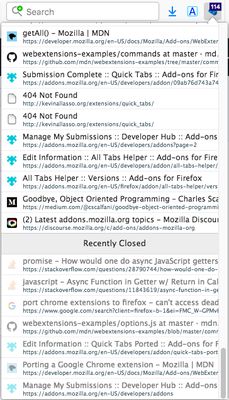
* Lists all the open tabs in Chrome across all of your open windows
* Tabs are listed in most recently used (MRU) order and excludes the current tab (since you're switching tabs)
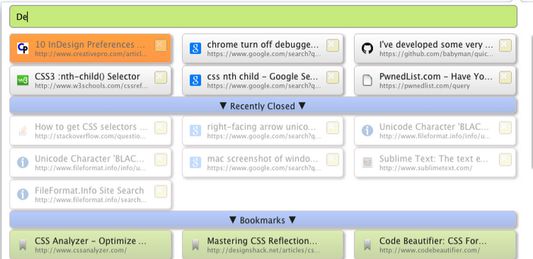
* Fuzzy search your bookmarks:
* Bookmarks are automatically searched when only a few tabs match your search string
* Add a space at the start or end of your search string to search bookmarks along with tabs
* Add two spaces at the start or end of your search string to search only bookmarks
* Fuzzy search your browser history:
* Add three spaces at the start or end of your search string to search browser history
* Find noisy tabs by searching for '<))' (then close them all with shift+ctrl+d ;-))
* Chrome keyboard shortcuts (configured using the keyboard shortcuts dialog at the bottom of the Chrome Extensions page):
* Shortcut key to launch popup window from most tabs (default ctrl+e, cmd+e on Mac, ctrl+q on Linux).
* Select previous tab without loading the popup window (unmapped by default)
* Select next tab without loading the popup window (unmapped by default)
* IMPORTANT the 'next tab' shortcut is only available for a second or so (while the badge text is orange) before the current tab is moved to the top of the MRU list.
* Tab list popup shortcut keys:
* Select previous tab (same as Chrome keyboard shortcut or up arrow)
* Select next tab (same as Chrome keyboard shortcut or down arrow)
* Switch to selected Item (enter)
* To close selected tab (default ctrl+d, see extension options)
* To close ALL displayed tabs in the tab list, honors search filtering (default shift+ctrl+d, see extension options)
* Displays the number of tabs you currently have open in all your Chrome windows
* Quickly search and select tabs by typing letters in the page title or url
* Track recently closed tabs and allow them to be searched and restored
* Popup customization using css
Features (taken from the Chrome Web Store edition)
* Lists all the open tabs in Chrome across all of your open windows
* Tabs are listed in most recently used (MRU) order and excludes the current tab (since you're switching tabs)
* Fuzzy search your bookmarks:
* Bookmarks are automatically searched when only a few tabs match your search string
* Add a space at the start or end of your search string to search bookmarks along with tabs
* Add two spaces at the start or end of your search string to search only bookmarks
* Fuzzy search your browser history:
* Add three spaces at the start or end of your search string to search browser history
* Find noisy tabs by searching for '<))' (then close them all with shift+ctrl+d ;-))
* Chrome keyboard shortcuts (configured using the keyboard shortcuts dialog at the bottom of the Chrome Extensions page):
* Shortcut key to launch popup window from most tabs (default ctrl+e, cmd+e on Mac, ctrl+q on Linux).
* Select previous tab without loading the popup window (unmapped by default)
* Select next tab without loading the popup window (unmapped by default)
* IMPORTANT the 'next tab' shortcut is only available for a second or so (while the badge text is orange) before the current tab is moved to the top of the MRU list.
* Tab list popup shortcut keys:
* Select previous tab (same as Chrome keyboard shortcut or up arrow)
* Select next tab (same as Chrome keyboard shortcut or down arrow)
* Switch to selected Item (enter)
* To close selected tab (default ctrl+d, see extension options)
* To close ALL displayed tabs in the tab list, honors search filtering (default shift+ctrl+d, see extension options)
* Displays the number of tabs you currently have open in all your Chrome windows
* Quickly search and select tabs by typing letters in the page title or url
* Track recently closed tabs and allow them to be searched and restored
* Popup customization using css
Оценено 27 рецензентами на 4,5
Разрешения и данные
Требуемые разрешения:
- Читать и изменять закладки
- Получать доступ к истории браузера
- Получать доступ ко вкладкам браузера
Больше сведений
- Ссылки дополнения
- Версия
- 1.0.6
- Размер
- 120,7 КБ
- Последнее обновление
- 6 лет назад (12 дек. 2019 г.)
- Связанные категории
- Лицензия
- Все права защищены
- История версий
- Добавить в подборку