
Jira Ticket Link Generator por Junhao Zhang
Generates a nice looking link for Jira tickets containing ticket ID, description and link
10 usuários10 usuários
Metadados da extensão
Capturas de tela
Sobre esta extensão
Generate link for Jira tickets from one click!
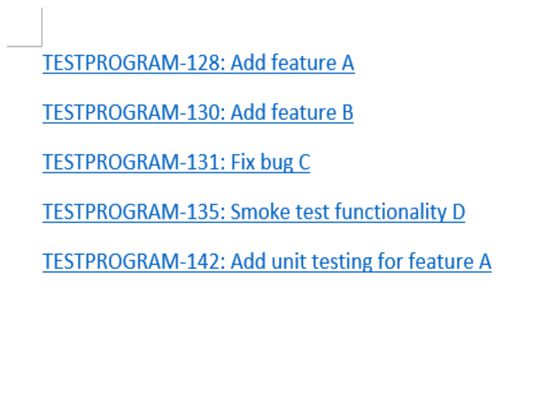
Generated link is in format of Ticket ID: Ticket Description
This extension currently supports:
1. Generate link for a single ticket:
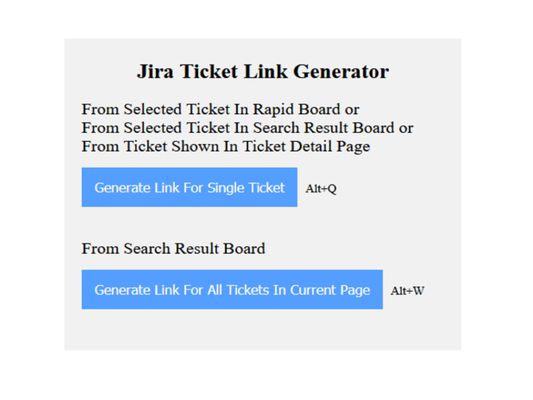
From selected ticket on rapid board, from selected ticket on search result board or from ticket being viewed in ticket detail page.
2. Generate link for all tickets shown up in current page of search result board.
[Usage]
- Option 1
When you are on rapid board and have a ticket selected, or you are on search result board and have a ticket selected, or you are viewing a ticket in its ticket detail page, click on button "Generate Link For Single Ticket" in extension (or use keyboard shortcut Alt + Q), a link for that ticket, in format of Ticket ID: Ticket Description, will be generated and copied to your clipboard, you can then paste it to wherever you need it!
- Option 2
When you are on search result board, click on button "Generate Link For All Tickets In Current Page" in extension (or use keyboard shortcut Alt + W), links related to all tickets shown up in current page of search result board will be generated and copied to clipboard.
[Notes]
1. For option 2, if your search result includes more than 50 tickets, Jira will display your result in different pages, only tickets in the page you are viewing will be copied in this scenario.
2. For option 2, when using it to generate a list of links and trying to copy to Microsoft Word, you'll notice line spacing between those links are different from line spacing between links generated using option 1. That's because Microsoft Word does not treat <br> between our links from option 2 as '\r\n'.
To resolve it, you just need to hit keyboard Backspace to remove the "incorrect-spacing" line break between links generated using option 2, and hit Enter to create a new line break.
Generated link is in format of Ticket ID: Ticket Description
This extension currently supports:
1. Generate link for a single ticket:
From selected ticket on rapid board, from selected ticket on search result board or from ticket being viewed in ticket detail page.
2. Generate link for all tickets shown up in current page of search result board.
[Usage]
- Option 1
When you are on rapid board and have a ticket selected, or you are on search result board and have a ticket selected, or you are viewing a ticket in its ticket detail page, click on button "Generate Link For Single Ticket" in extension (or use keyboard shortcut Alt + Q), a link for that ticket, in format of Ticket ID: Ticket Description, will be generated and copied to your clipboard, you can then paste it to wherever you need it!
- Option 2
When you are on search result board, click on button "Generate Link For All Tickets In Current Page" in extension (or use keyboard shortcut Alt + W), links related to all tickets shown up in current page of search result board will be generated and copied to clipboard.
[Notes]
1. For option 2, if your search result includes more than 50 tickets, Jira will display your result in different pages, only tickets in the page you are viewing will be copied in this scenario.
2. For option 2, when using it to generate a list of links and trying to copy to Microsoft Word, you'll notice line spacing between those links are different from line spacing between links generated using option 1. That's because Microsoft Word does not treat <br> between our links from option 2 as '\r\n'.
To resolve it, you just need to hit keyboard Backspace to remove the "incorrect-spacing" line break between links generated using option 2, and hit Enter to create a new line break.
Avaliado em 5 por 1 revisor
Permissões e dados
Mais informações
- Links da extensão
- Versão
- 1.2.1
- Tamanho
- 56,84 KB
- Ultima atualização
- há 5 anos (25 de fev de 2021)
- Categorias relacionadas
- Licença
- Todos os direitos reservados
- Histórico de versões
- Adicionar a uma coleção