
TabTamer di mcortt
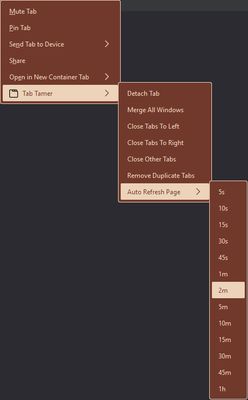
Close tabs left, right, other, close duplicate tabs, detach tab(s), merge windows, auto-refresh tab maximize windows on startup and/or creation.
2 utenti2 utenti
Metadati estensione
Screenshot

Informazioni sull’estensione
<ul>
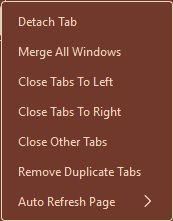
<li><b>Context-menu and keyboard shortcuts to:</b>
<ul>
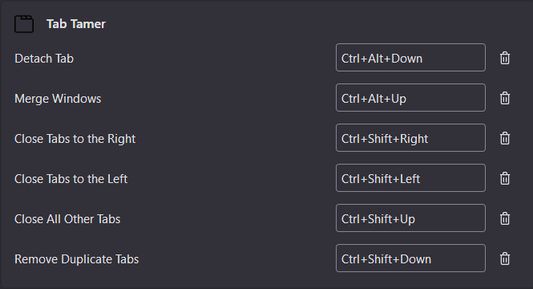
<li>Close all tabs to the left (<strong>Ctrl+Shift+LeftArrow</strong>)</li>
<li>Close all tabs to the right (<strong>Ctrl+Shift+RightArrow</strong>)</li>
<li>Close all other tabs (<strong>Ctrl+Shift+UpArrow</strong>)</li>
<li>Close all duplicate tabs (<strong>Ctrl+Shift+DownArrow</strong>)</li>
<li>Detach current tab(s) to new window (<strong>Ctrl+Alt+DownArrow</strong>)</li>
<li>Merge all windows into a single window (<strong>Ctrl+Alt+UpArrow</strong>)</li>
<li>Auto-refresh tabs (context-menu only)
<ul>
<li><i>URLbar Page Action: If you have set auto-refresh, there will be a page action button shown in the URLbar. Clicking it will cease the auto-refresh for that tab.</i></li>
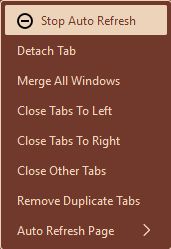
<li><i>Dynamic Context-Menu Option: If auto-refresh is set for the current tab, you can cancel it by going into TabTamer's context-menu and click the option "Stop Auto Refresh" with the icon beside it.</i></li>
</ul>
</li>
</ul>
</li>
</ul>
<b>Options:</b>
<ul>
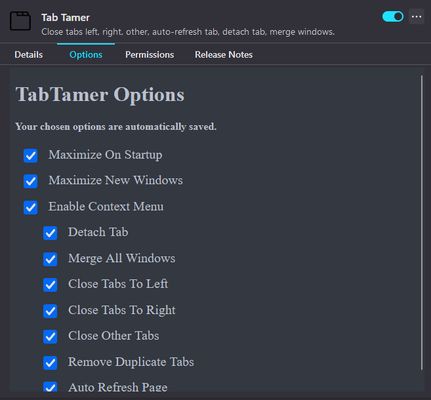
<li>Maximize windows on startup and/or creation</li>
<li>Customize context-menu</li>
</ul>
<li><b>Context-menu and keyboard shortcuts to:</b>
<ul>
<li>Close all tabs to the left (<strong>Ctrl+Shift+LeftArrow</strong>)</li>
<li>Close all tabs to the right (<strong>Ctrl+Shift+RightArrow</strong>)</li>
<li>Close all other tabs (<strong>Ctrl+Shift+UpArrow</strong>)</li>
<li>Close all duplicate tabs (<strong>Ctrl+Shift+DownArrow</strong>)</li>
<li>Detach current tab(s) to new window (<strong>Ctrl+Alt+DownArrow</strong>)</li>
<li>Merge all windows into a single window (<strong>Ctrl+Alt+UpArrow</strong>)</li>
<li>Auto-refresh tabs (context-menu only)
<ul>
<li><i>URLbar Page Action: If you have set auto-refresh, there will be a page action button shown in the URLbar. Clicking it will cease the auto-refresh for that tab.</i></li>
<li><i>Dynamic Context-Menu Option: If auto-refresh is set for the current tab, you can cancel it by going into TabTamer's context-menu and click the option "Stop Auto Refresh" with the icon beside it.</i></li>
</ul>
</li>
</ul>
</li>
</ul>
<b>Options:</b>
<ul>
<li>Maximize windows on startup and/or creation</li>
<li>Customize context-menu</li>
</ul>
Voto 2,5 da 2 revisori
Permessi e dati
Ulteriori informazioni
- Link componente aggiuntivo
- Versione
- 1.4.7
- Dimensione
- 13,72 kB
- Ultimo aggiornamento
- 2 mesi fa (21 gen 2026)
- Categorie correlate
- Informativa sulla privacy
- Consulta l’informativa sulla privacy per questo componente aggiuntivo
- Cronologia versioni
- Aggiungi alla raccolta