Componenti aggiuntivi per Firefox
  • Estensioni
  • Temi
    • per Firefox
    • Dizionari e language pack
    • Altri siti
    • Componenti aggiuntivi per Android
Accedi
Anteprima di REtoUN

REtoUN di DBSH

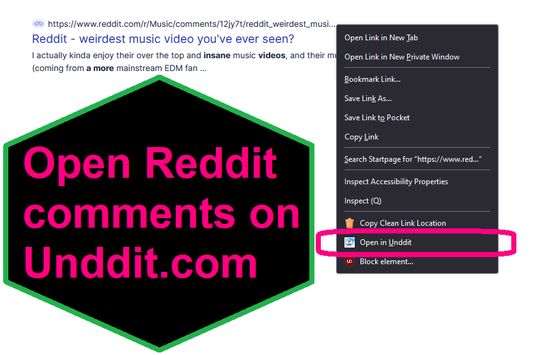
EXTENSION IS DEPRECATED - SEE ABOUT THIS EXTENSION BELOW FOR MORE DETAIL A simple extension that adds an option to the context menu to open links to Reddit comments on unddit.com instead, in a new tab.

0 (0 recensioni)0 (0 recensioni)
2 utenti2 utenti
Scarica Firefox e installa l’estensione
Scarica file

Metadati estensione

Screenshot
Informazioni sull’estensione
EXTENSION IS DEPRECATED. NOTES: https://www.unddit.com is gone, and its existence was necessary for this extension to function. I am leaving this extension published for educational purposes (someone may want to use the source for a similar use case where an option in the context menu links to a re-written URL)

This is for those who prefer to read Reddit comments on https://www.unddit.com - maybe you prefer to see deleted comments, or maybe you think "continue this thread" is a crime against UI.
To use, right-click on a link to a Reddit post, and choose Open in Unddit from the context menu. If the link to the Reddit post is https://www.reddit.com/r/news/comments/130kndv for example, using REtoUN will open https://www.unddit.com/r/news/comments/130kndv instead, in a new tab.
Commenti dello sviluppatore
Note that in Firefox, content on https://www.unddit.com requires turning off Enhanced Tracking Protection to load. This behavior is not at all related to this extension.

Developer is not affiliated with Unddit.com, but is a huge fan of the project.

To view this extension's source code:
1. In a Firefox instance that already has this extension installed, type about:profiles in the Firefox address bar, then press Enter
2. Under the profile labeled This is the profile in use and it cannot be deleted, click on the Open Directory button (appears as Open Folder on Windows) next to Root Directory
3. In the file explorer window that opens, go into the extensions directory (the extensions folder)
4. Copy the file {d40ec1bd-9875-4dbd-a1f7-cba6e2d9d281}.xpi and paste it somewhere else, such as your Desktop
5. Rename the file you just pasted, changing the extension to .zip - so {d40ec1bd-9875-4dbd-a1f7-cba6e2d9d281}.xpi becomes {d40ec1bd-9875-4dbd-a1f7-cba6e2d9d281}.zip
6. Unzip the file {d40ec1bd-9875-4dbd-a1f7-cba6e2d9d281}.zip. The extracted files are the source, especially the .json and .js files.
Voto 0 da 0 revisori
Effettua l’accesso per dare un voto a questa estensione
Non ci sono ancora valutazioni

Valutazione in stelle salvata

5
0
4
0
3
0
2
0
1
0
Ancora nessuna recensione
Permessi e dati

Permessi obbligatori:

  • Accedere alle schede
Ulteriori informazioni
Versione
1.0
Dimensione
26,31 kB
Ultimo aggiornamento
3 anni fa (27 apr 2023)
Categorie correlate
  • RSS, news e blog
  • Privacy e sicurezza
  • Social e comunicazione
Licenza
Solo GNU General Public License v3.0
Informativa sulla privacy
Consulta l’informativa sulla privacy per questo componente aggiuntivo
Cronologia versioni
  • Visualizza tutte le versioni
Aggiungi alla raccolta
Segnala questo componente aggiuntivo
Vai alla pagina principale del sito Mozilla

Componenti aggiuntivi

  • Informazioni
  • Blog sui componenti aggiuntivi per Firefox
  • Laboratorio estensioni
  • Centro di sviluppo
  • Criteri per sviluppatori
  • Blog della comunità
  • Forum
  • Segnala malfunzionamento
  • Guida per le recensioni

Browser

  • Desktop
  • Mobile
  • Enterprise

Prodotti

  • Browsers
  • VPN
  • Relay
  • Monitor
  • Pocket
  • Bluesky (@firefox.com)
  • Instagram (Firefox)
  • YouTube (firefoxchannel)
  • Informativa sulla privacy
  • Cookie
  • Note legali

Eccetto dove diversamente indicato, i contenuti su questo sito sono distribuiti con licenza Creative Commons Attribuzione Condividi allo stesso modo 3.0 o versioni successive.