Hide Subscribed Listing di Asjad
Hide YouTube subscribed videos by clicking on thumbnail of videos on subscription page.
Metadati estensione
Screenshot
Informazioni sull’estensione
Hide subscribed Listing
Hide YouTube subscribed videos by clicking on thumbnail of videos on subscription page.
How to use
Hide YouTube subscribed videos by clicking on thumbnail of videos on subscription page.
How to use
- Download and Install Extension
- Go to subscription page of YouTube web app
- Wait for the page to load
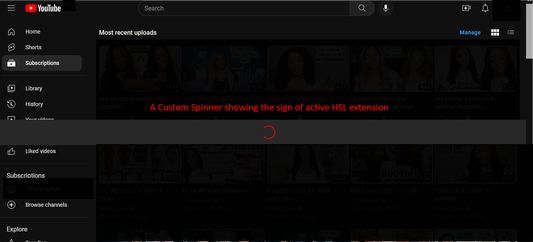
- A custom spinner will appear that will do some page modification
- Wait for the spinner to disappear
- Click on a video's thumbnail
- That video will be hidden from the subscription page
- Enjoy :)
Voto 3 da 1 revisore
Permessi e dati
Permessi obbligatori:
- Visualizzare notifiche
- Accedere alle schede
- Accedere ai dati utente di www.youtube.com
Ulteriori informazioni
- Link componente aggiuntivo
- Versione
- 1.32
- Dimensione
- 108,76 kB
- Ultimo aggiornamento
- 3 anni fa (31 lug 2023)
- Categorie correlate
- Licenza
- Tutti i diritti riservati
- Cronologia versioni
- Aggiungi alla raccolta