
Certificate Watch di PilzAdam
Warns when TLS certificates change over time.
54 utenti54 utenti
Metadati estensione
Screenshot
Informazioni sull’estensione
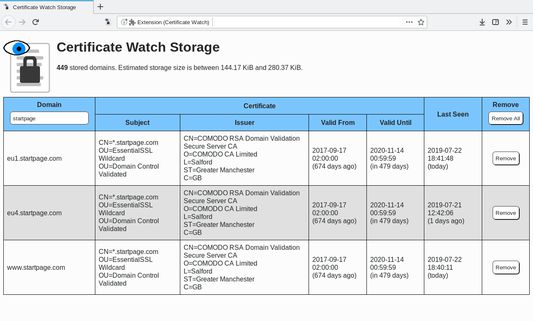
This add-on watches over the TLS certificates that websites present to you and warns when the certificate for a domain changes. If a new domain is encountered, its certificate is added to the local storage of this add-on. Future connections to that domain will check that the certificate is still the same as in the local storage.
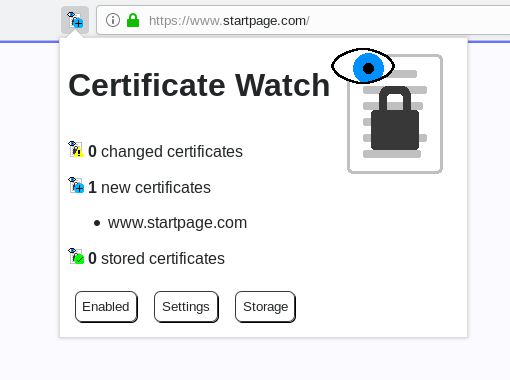
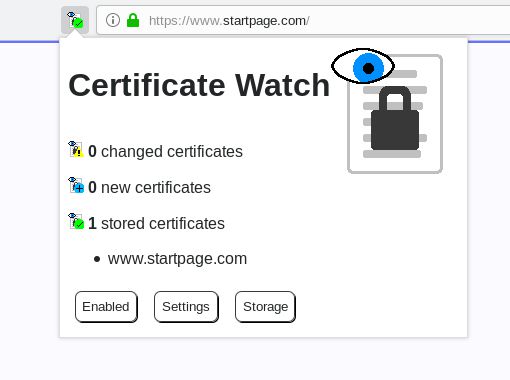
The add-on icon can display three possible states:
This add-on can be a countermeasure to attacks where the attacker has a valid certificate for the attacked website. Changes to the certificate that the browser happily accepts can no longer go unnoticed. The goal of this countermeasure is simply to make the user aware that something has changed; user intervention is still required.
Be aware of the following points:
The add-on icon can display three possible states:
- Stored: The certificate of the domain is the same as the one in storage.
- New: There is no previous certificate stored for this domain; the new one is automatically added to the storage.
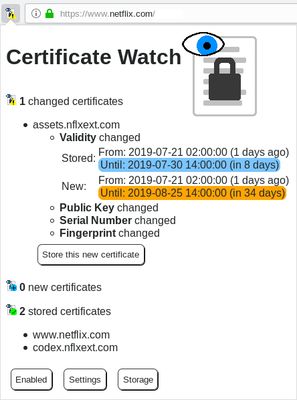
- Changed: The certificate of the connection is different to the one in storage. This means, that the certificate of the website was changed. A click on the add-on icon will display more information and has the option to accept the new certificate into the local storage (overriding the old certificate).
This add-on can be a countermeasure to attacks where the attacker has a valid certificate for the attacked website. Changes to the certificate that the browser happily accepts can no longer go unnoticed. The goal of this countermeasure is simply to make the user aware that something has changed; user intervention is still required.
Be aware of the following points:
- This add-on does not check that certificates are valid. The browser does this already. This add-on only compares certificates of connections that the browser deems safe.
- This add-on does not block any requests where the certificate has changed. It only informs the user of this fact. If the add-on displays a changed certificate, it is up to the user to decide what to do (e.g. leave the page, accept the certificate, or something else).
- This add-on implements Trust On First Use (TOFU): the first certificate that is encountered for a domain is automatically trusted. Only future changes will raise a warning.
- Users of this add-on should already have basic knowledge of how certificates for TLS connections work. The warnings generated by this add-on only make sense if the user can correctly interpret them.
- This add-on does not work in private browsing mode (see Firefox bug 1329304).
Voto 5 da 2 revisori
Permessi e dati
Permessi obbligatori:
- Accedere ai dati di tutti i siti web
Permessi facoltativi:
- Accedere alle schede
Ulteriori informazioni
- Link componente aggiuntivo
- Versione
- 1.12.0
- Dimensione
- 48,46 kB
- Ultimo aggiornamento
- 6 anni fa (1 dic 2019)
- Categorie correlate
- Licenza
- Apache License 2.0
- Cronologia versioni
- Aggiungi alla raccolta