SkipTo Landmarks & Headings Autor: Nicholas Hoyt
Provides keyboard access to landmark regions and headings (h1–h6) on a web page.
80 korisnika80 korisnika
Metapodaci proširenja
Snimke ekrana
Informacije o ovom proširenju
Overview
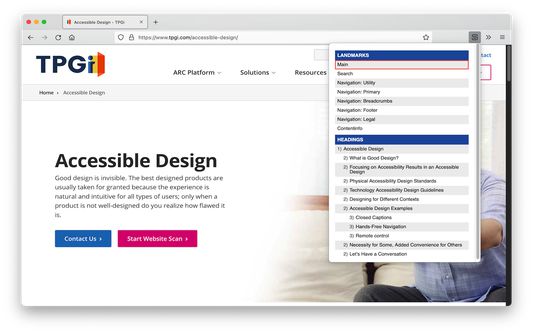
SkipTo Landmarks & Headings extends the web browser by providing a menu for easy navigation to the ARIA landmark regions and HTML section headings of a web page.
The keyboard shortcut for opening the menu is alt+2 (option+2 on Mac keyboards) and cursors keys can be used to navigate the menu.
Activating a menu item scrolls the corresponding landmark region or heading element into view and moves keyboard focus to it on the page.
Complete documentation on keyboard shortcuts, options/preferences and more is available at the SkipTo Documentation website at https://skipto.github.io/.
SkipTo Landmarks & Headings extends the web browser by providing a menu for easy navigation to the ARIA landmark regions and HTML section headings of a web page.
The keyboard shortcut for opening the menu is alt+2 (option+2 on Mac keyboards) and cursors keys can be used to navigate the menu.
Activating a menu item scrolls the corresponding landmark region or heading element into view and moves keyboard focus to it on the page.
Complete documentation on keyboard shortcuts, options/preferences and more is available at the SkipTo Documentation website at https://skipto.github.io/.
Ocjena 5 od 2 recenzenta
Daljnje informacije
- Poveznice dodatka
- Verzija
- 2.2.0
- Veličina
- 40,19 KB
- Zadnje aktualiziranje
- prije 4 godine (10. lis. 2021)
- Povezane kategorije
- Licenca
- Mozilla javna licenca 2.0
- Povijest verzija
- Dodaj u zbirku