
Sidebery Autor: mbnuqw
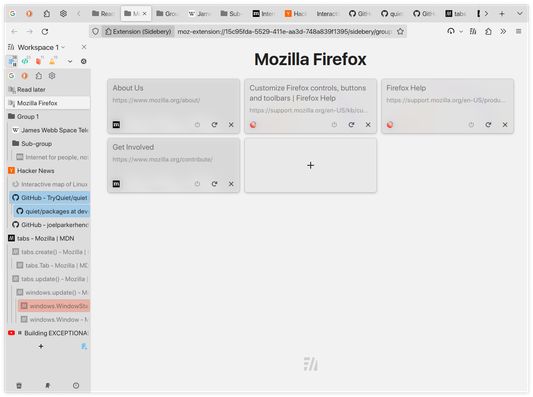
Vertical tabs tree and bookmarks in sidebar with advanced containers configuration, grouping and many other features.
Metapodaci proširenja
Snimke ekrana

Informacije o ovom proširenju
Sidebery provides the list of tabs structured in a tree, bookmarks and history within the customizable panels. It aims to be fast and configurable.
Notice: Sidebery may conflict with addons that handle position of new tabs (e.g. Tree Style Tabs) or addons that move/sort tabs, which may result in unexpected behavior or broken tabs state at initialization. To avoid potential issues, please, disable such addons in Add-ons Manager page (about:addons).
Some of the key features:
Privacy policy
Source code
Permissions
Optional permissions
Notes
Donate to support the development of this project
More info you can find here
Notice: Sidebery may conflict with addons that handle position of new tabs (e.g. Tree Style Tabs) or addons that move/sort tabs, which may result in unexpected behavior or broken tabs state at initialization. To avoid potential issues, please, disable such addons in Add-ons Manager page (about:addons).
Some of the key features:
- - Tabs
- - Simple flat list or tree with the option to set tree limit.
- Group tabs (aka folders) with a custom name helps organize open pages.
- Tabs colorization: Automatic per-domain/URL or manual.
- Tabs sorting: by title, url or access time
- Automatic unloading of tabs in a folded branch / inactive panel.
- Customizable tab title.
- ...
- - Tree or chronological view.
- Sort by name, URL or creation time
- Basic operations: open in... / create / edit / delete.
- Ability to highlight open bookmarks and activate the corresponding tab instead of opening a new one when clicked.
- Automatically delete a bookmark on opening from "Other Bookmarks" folder or configured bookmarks panel.
- ...
- - Organize your browsing with panels of tabs/bookmarks.
- Convert open tabs in the panel to bookmarks and vice versa.
- Automatically move tabs by URL to configured panel.
- ...
- - Bind container to the tabs panel.
- Automatically reopen tab in the target container by URL.
- Setup proxy config and UserAgent header for tabs in a container.
- ...
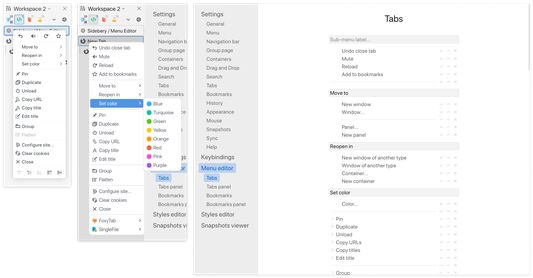
- Sidebery allows you to change the context menu for tabs and bookmarks. You can enable/disable/move options, create sub-menus/separators.
- - Option to switch tabs with mouse-wheel.
- Configurable drag and drop behavior.
- A growing list of available actions for mouse/keyboard bindings.
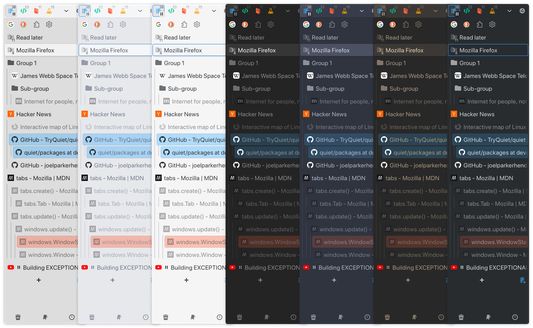
- Sidebery provides full control of styles for sidebar and group page via variables and custom CSS.
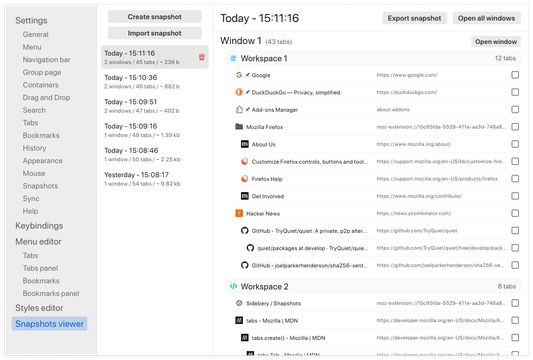
- You can setup auto snapshots that will keep info about open windows and tabs.
Privacy policy
- - Sidebery does not engage in ad targeting, data collection, or other activities that could compromise your privacy.
- By default, all data is stored locally on your machine.
- Sidebery sends data only when synchronization is enabled and only to chosen provider.
- You can optionally enable one or more synchronization providers (third-party services) to sync your data across multiple devices.
More detailed information can be found on this page: https://github.com/mbnuqw/sidebery/blob/v5/PRIVACY.md
Source code
- Source code can be found here: https://github.com/mbnuqw/sidebery
Permissions
- - "Access recently closed tabs" - needed for the "Undo close tab" function.
- "Access browser tabs" - needed to get info and control tabs.
- "Store unlimited amount of client-side data" - needed to store favicons cache and snapshots.
Optional permissions
- - "Access your data for all websites" and "Control browser proxy settings"
- Required for the next features:
- Context menu option for cleaning cookies
- Proxy and url rules of containers
- Page-screenshots for the group page and windows selection panel
- Changing the User-Agent per container
- Required for the next features:
- Hiding tabs on inactive panels
- Hiding folded tabs
- "Access browsing history" - for history panel functionality.
- "Input data to the clipboard" - Context menu option for copying urls of tabs and bookmarks
- "Download files and read and modify the browser’s download history" - Auto-export of snapshots.
Note: You can deny these permissions at any time on the settings page.
Notes
- - Firefox doesn't allow addons to hide the native (horizontal) tab bar. To achieve that, you can use userChrome.css hacks.
Donate to support the development of this project
- - Payeer:
P1128042154- Bitcoin (BTC):
bc1q2drx3x5pfl0c68urwztvjrwgksg9u3l7mn4g4m- Ethereum (ETH), USDT (ERC20), USDC (ERC20):
0x11667D20AB328194AEEc68F9385CCcf713607929- Tron (TRX), USDT (TRC20), USDC (TRC20):
TJEdp1TnsN7Jfhfi9Db8yXKDK8NEUovCZb- Litecoin (LTC):
ltc1qpv4c4kaahdzhcwzj8yyrwlvnfcw2hw5qpxqr62- Solana (SOL):
GdWipUmnhdDa7kqkF3SJm5jTYqp3UsTdbcGCC1xLbVJf- TON:
UQAxwOfvZQz1YR4qieiE-J4wHiz3zrMXAyxDiRJQQXIDX8MHMore info you can find here
Ocjena 4,7 od jednog recenzenta
Dozvole i podaci
Potrebne dozvole:
- Pristup nedavno zatvorenim karticama
- Pristup karticama preglednika
Opcionalne dozvole:
- Čitati i mijenjati zabilješke
- Preuzeti podatke iz međuspremnika
- Unijeti podatke u međuspremnik
- Preuzeti datoteke te čitati i promijeniti povijest preuzimanja preglednika
- Pristup povijesti pregledavanja
- Upravljati proxy postavkama preglednika
- Sakriti i prikazati kartice preglednika
- Pristup tvojim podacima za sve web stranice
Prikupljanje podataka:
- Programer kaže da ovo proširenje ne zahtijeva prikupljanje podataka.
Opcionalno prikupljanje podataka prema navodima programera:
- Aktivnost pregledavanja
Daljnje informacije
- Poveznice dodatka
- Verzija
- 5.5.0
- Veličina
- 569,01 KB
- Zadnje aktualiziranje
- prije 2 mjeseca (8. velj. 2026)
- Povezane kategorije
- Licenca
- MIT licenca
- Povijest verzija
- Dodaj u zbirku