Dodaci za preglednik Firefox
Proširenja
Teme
Više …
za Firefox
Rječnici i jezični paketi
Druge stranice preglednika
Dodaci za Android
Prijavi se
Traži
Traži
Quick Clone
Autor:
Kartikay Bagla
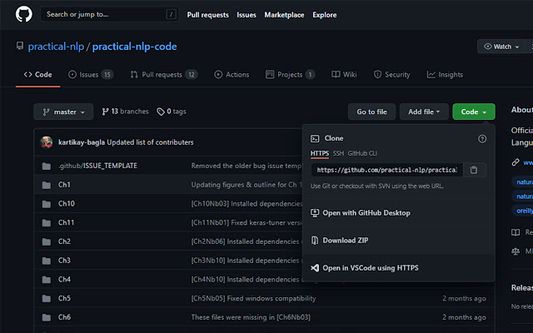
Quick Clone can open GitHub repositories in VS Code with one click.
Eksperimentalno
Eksperimentalno
0 (0 recenzije)
0 (0 recenzije)
27 korisnika
27 korisnika
Preuzmi Firefox i nabavi proširenje
Preuzmi datoteku
Metapodaci proširenja
Snimke ekrana
Informacije o ovom proširenju
How to use
Install the
VS Code extension
Install the corresponding browser extension
Navigate to a GitHub repository in your browser
Click on the green Code button and select "Open in VSCode"
Once VS Code opens, select the folder where the repository will be cloned
Once the cloning is complete, you can choose to open the cloned folder
Ocjena 0 od 0 recenzenta
Prijavi se i ocijeni ovo proširenje
Još nema ocjena
Ocjena je spremljena
5
0
4
0
3
0
2
0
1
0
Dozvole i podaci
Potrebne dozvole:
Pristup tvojim podacima za github.com
Daljnje informacije
Poveznice dodatka
Početna stranica
Stranica podrške
E-adresa podrške
Verzija
1.0.1
Veličina
15,79 KB
Zadnje aktualiziranje
prije 5 godina (21. kol. 2021)
Povezane kategorije
Ostalo
Licenca
Samo GNU Opća javna licenca v3.0
Povijest verzija
Pogledaj sve verzije
Dodaj u zbirku
Odaberi zbirku …
Stvori novu zbirku
Prijavi ovaj dodatak