
CodeSynapse Autor: Mohatamim
Track solved problems by rating and date, and automatically sync your accepted Codeforces solutions to a GitHub repository.
4 korisnika4 korisnika
Metapodaci proširenja
Snimke ekrana


Informacije o ovom proširenju
Excellent! Thank you for sharing these screenshots. The charts on the profile page and the "Target" feature are fantastic additions. They make the extension much more powerful than just a simple sync tool.
Seeing these features in action, I've revised the add-on description to be more accurate and compelling. This new version highlights the rich visualization and goal-setting capabilities.
Here is the updated description for you to copy and paste:
Supercharge Your Competitive Programming Workflow!
CodeSynapse is the ultimate toolkit for every competitive programmer on Codeforces. It goes beyond just saving your code by providing powerful tools to visualize your progress, set goals, and automatically build your solution portfolio on GitHub.
Key Features:
How It Works:
Install CodeSynapse today and transform your problem-solving data into actionable insights and a lasting legacy.
Seeing these features in action, I've revised the add-on description to be more accurate and compelling. This new version highlights the rich visualization and goal-setting capabilities.
Here is the updated description for you to copy and paste:
Supercharge Your Competitive Programming Workflow!
CodeSynapse is the ultimate toolkit for every competitive programmer on Codeforces. It goes beyond just saving your code by providing powerful tools to visualize your progress, set goals, and automatically build your solution portfolio on GitHub.
Key Features:
Advanced Progress Visualization: Get a deeper understanding of your skills with two custom charts added directly to your Codeforces profile:

    Problem Ratings Chart: A bar chart that beautifully displays the count of problems you've solved at each difficulty rating.

    Tags Solved Chart: A donut chart that breaks down your solved problems by tags (e.g., dp, greedy, data structures), showing you where your expertise lies.

Set & Track Personal Goals: Use the custom "Target" widget to challenge yourself. Set goals to solve a specific number of problems within a certain rating range and time period, and track your progress right from the problemset page.

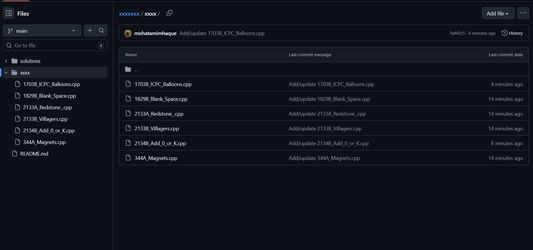
Automatic GitHub Sync: As soon as you get an "Accepted" verdict, CodeSynapse automatically commits and pushes your solution to your chosen GitHub repository. No more copy-pasting!

Effortless Portfolio Building: Showcase your skills, dedication, and consistency to peers or potential employers with a perfectly organized and up-to-date repository of your solutions.
How It Works:
Install the add-on.

Authorize your GitHub account via the settings page.

Specify your target repository.

That's it! Enjoy the new features on Codeforces and watch your GitHub portfolio grow automatically.
Install CodeSynapse today and transform your problem-solving data into actionable insights and a lasting legacy.
Ocjena 5 od jednog recenzenta
Dozvole i podaci
Potrebne dozvole:
- Pristup tvojim podacima za codeforces.com
Opcionalne dozvole:
- Pristup tvojim podacima za codeforces.com
- Pristup tvojim podacima za api.github.com
Daljnje informacije
- Poveznice dodatka
- Verzija
- 2.0
- Veličina
- 219,59 KB
- Zadnje aktualiziranje
- prije 7 mjeseci (3. ruj. 2025)
- Povezane kategorije
- Licenca
- Sva prava pridržana
- Politika privatnosti
- Pročitaj politiku privatnosti za ovaj dodatak
- Licencni ugovor za krajnjeg korisnika
- Pročitaj licencni ugovor za ovaj dodatak
- Povijest verzija
- Oznake
- Dodaj u zbirku
Thank you for taking the time to review CodeSynapse.
This add-on is designed for competitive programmers. Its primary purpose is to help users visualize their problem-solving progress on Codeforces and automatically back up their accepted solutions to a GitHub repository of their choice.
Permissions Justification:
storage: This permission is used to securely store the user's settings locally on their own device. This includes their GitHub Personal Access Token and target repository name.

host_permissions for https://codeforces.com/*: This is required to inject the progress visualization charts (Problem Ratings and Tags Solved) onto the user's profile page and to detect when a problem has been successfully solved.

host_permissions for https://api.github.com/*: This is required to allow the extension to communicate directly with the GitHub API to commit and push the user's solution files.
Handling of Sensitive Data (GitHub Token):
I want to be very clear that the user's GitHub Personal Access Token is handled with the utmost care. It is stored exclusively in the browser's secure local storage (browser.storage) and is never collected, stored, or transmitted to any external server or service that I control. The extension's architecture is privacy-first, and all communication happens directly between the user's browser and the GitHub API.
To Test the Core Functionality:
After installation, please navigate to the extension's options page.

Enter a GitHub Personal Access Token (with repo scope) and the name of a target repository.

Visit any user's profile page on Codeforces to see the charts injected onto the page.

The sync feature triggers when a solution receives an "Accepted" verdict.