Dodaci za preglednik Firefox
  • Proširenja
  • Teme
    • za Firefox
    • Rječnici i jezični paketi
    • Druge stranice preglednika
    • Dodaci za Android
Prijavi se
Pregled za Amazon DP and ASIN Only

Amazon DP and ASIN Only Autor: DBSH

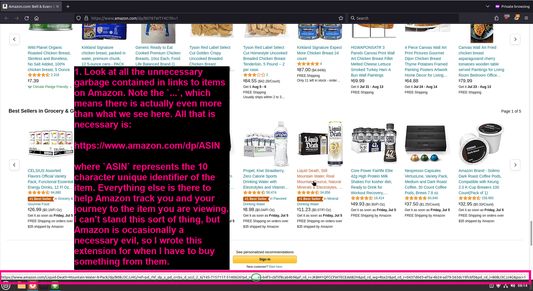
Adds an option to the context menu to open links to items on Amazon in a new tab, using only DP and the ASIN, stripping away all the, ref, tracking, and other unnecessary URL parameters so URLs look like https://www.amazon.com/dp/ASIN

0 (0 recenzije)0 (0 recenzije)
2 korisnika2 korisnika
Preuzmi Firefox i nabavi proširenje
Preuzmi datoteku

Metapodaci proširenja

Snimke ekrana
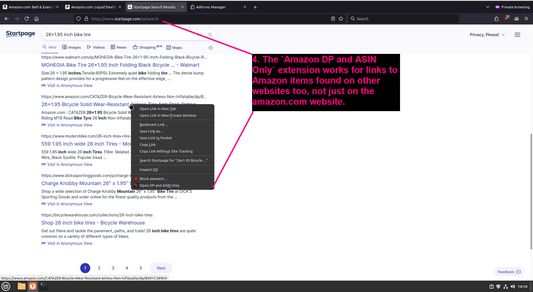
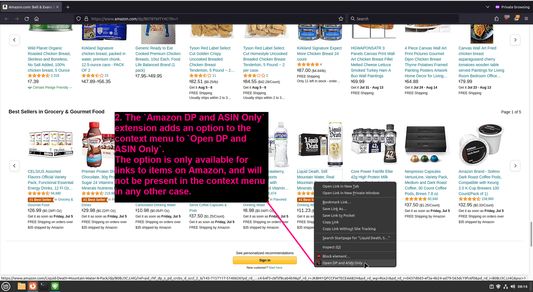
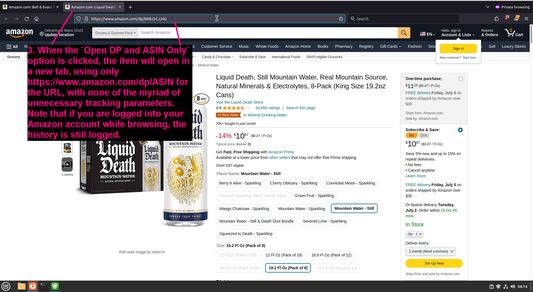
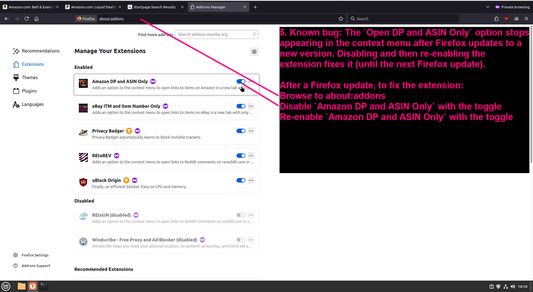
Look at all the unnecessary garbage contained in links to items on AmazonThe `Amazon DP and ASIN Only` extension adds an option to the context menu to `Open DP and ASIN Only`When the `Open DP and ASIN Only` option is clicked, the item will open in a new tab, using only https://www.amazon.com/dp/ASIN for the URL, with none of the myriad of unnecessary tracking parametersThe `Amazon DP and ASIN Only` extension works for links to Amazon items found on other websites too, not just on the amazon.com websiteKnown bug: The `Open DP and ASIN Only` option stops appearing in the context menu after Firefox updates to a new version
Informacije o ovom proširenju
Adds an option to the context menu to open links to items on Amazon in a new tab, using only DP and the ASIN, stripping away all the, ref, tracking, and other unnecessary URL parameters so URLs look like https://www.amazon.com/dp/ASIN
Komentari razvijatelja
To view this extension's source code:
  1. In a Firefox instance that already has this extension installed, type `about:profiles` in the Firefox address bar, then press Enter
  2. Under the profile labeled `This is the profile in use and it cannot be deleted`, click on the `Open Directory` button (appears as `Open Folder` on Windows) next to `Root Directory`
  3. In the file explorer window that opens, go into the `extensions` directory (the `extensions` folder)
  4. Copy the file `{91f0f467-2cdb-4bab-b460-652b7aceaacd}.xpi` and paste it somewhere else, such as your Desktop
  5. Rename the file, changing the extension to `.zip` - so `{91f0f467-2cdb-4bab-b460-652b7aceaacd}.xpi` becomes `{91f0f467-2cdb-4bab-b460-652b7aceaacd}.zip`
  6. Unzip the file `{91f0f467-2cdb-4bab-b460-652b7aceaacd}.zip`. The extracted files are the source, especially the .json and .js files.
Ocjena 0 od strane 0 korisnika
Prijavi se i ocijeni ovo proširenje
Još nema ocjena

Ocjena je spremljena

5
0
4
0
3
0
2
0
1
0
Još nema recenzija
Dozvole i podaci

Potrebne dozvole:

  • Pristupiti karticama preglednika
Saznaj više
Daljnje informacije
Verzija
1.0.1
Veličina
27,53 KB
Zadnje aktualiziranje
prije godinu (29. lip. 2024)
Povezane kategorije
  • Privatnost i sigurnost
  • Kupovanje
Licenca
Samo GNU Opća javna licenca v3.0
Politika privatnosti
Pročitaj politiku privatnosti za ovaj dodatak
Povijest verzija
  • Pogledaj sve verzije
Dodaj u zbirku
Prijavi ovaj dodatak
Idi na početnu stranicu Mozille

Dodaci

  • Informacije
  • Blog za Firefox dodatke
  • Radionica za proširenja
  • Centar za programere
  • Pravila za programere
  • Blog zajednice
  • Forum
  • Prijavi grešku
  • Priručnik za recenziranje

Preglednici

  • Desktop
  • Mobile
  • Enterprise

Proizvodi

  • Browsers
  • VPN
  • Relay
  • Monitor
  • Pocket
  • Bluesky (@firefox.com)
  • Instagram (Firefox)
  • YouTube (firefoxchannel)
  • Privatnost
  • Kolačići
  • Pravne informacije

Osim gdje je drugačije navedeno, sadržaj ove stranice licenciran je pod licencom Creative Commons Imenovanje dijeli pod istim uvjetima verzija 3.0 ili novijoj.